Evaluations in the chat
UserWhen you ask the chat about company data, for example “How did revenue develop by month last quarter?”, the AI answers with an evaluation: a composed view of key figures, charts and tables. What makes it special: the AI does not write the numbers. It only decides which query fills which field; CompanyWizard inserts the values from your SQL tools when the view is displayed. The AI therefore cannot copy a number wrongly, and the view shows the current state the next time you open it.
The data comes from the SQL tools your administrators set up and released for you (→ Set up a SQL data source as a tool). Without a suitable tool the AI can still build a view, but only with values it writes into the answer itself (see “Values from the model’s answer”).
License: SQL tools are included from Pro. In the Free edition, evaluations therefore only show values from the model’s answer. → License & edition model
The screenshots in this article show the German user interface. The button names in the text are those of the English interface.
Web and desktop
Section titled “Web and desktop”Evaluations exist in the web and in the desktop app. The desktop app knows more building blocks (→ Web vs. desktop):
- Web and desktop: text and key figures, frames and rows/columns for the layout, column, line and pie charts, tables.
- Desktop only, in addition: more chart types (bar, spline, area, stacked columns, doughnut) with up to 8 data series, tables with number and date formats, tree tables, a calendar (read-only), heat maps, maps (Germany, DACH region, Europe, world) and inputs such as a text field and a slider. Each building block shows at most 1000 rows.
If the AI uses a desktop-only building block in the web, the view shows a message instead of the evaluation (see “Messages in the view”).
Live: the normal case
Section titled “Live: the normal case”An evaluation starts out live. Below it is “Data updated …” with the time the query ran.
When you open the chat again later, the queries run fresh — with your current permissions. If your administrators have blocked a tool in the meantime, you see the reason instead of the numbers. The AI is not asked again.
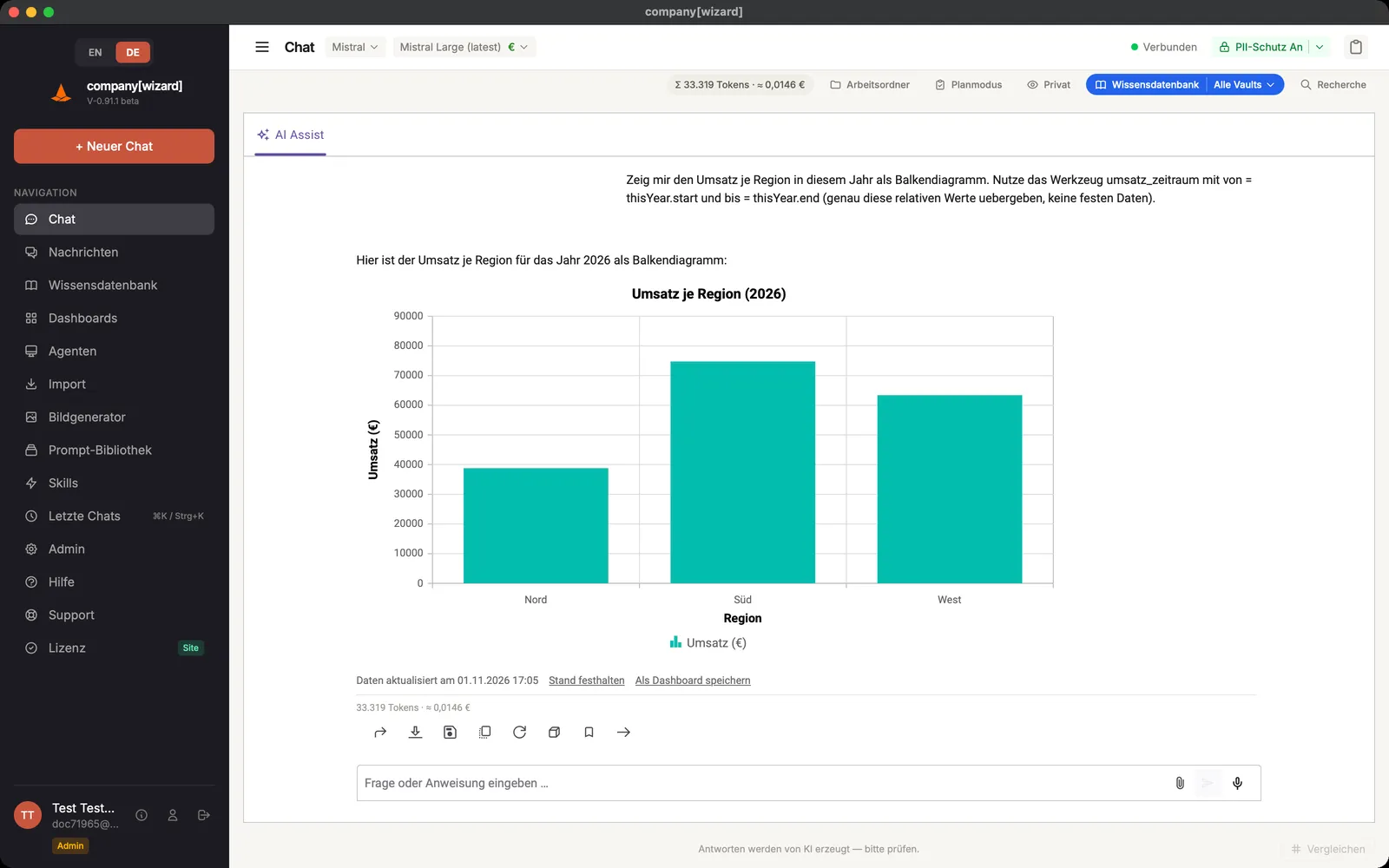
A live evaluation: query time and “Keep this snapshot” below the chart.
Shortly after the answer (up to 10 minutes), CompanyWizard shows the rows already queried for the answer instead of asking the database again. Your release for the tool is still checked. In this case the time shown is the time of the answer.
Keep this snapshot
Section titled “Keep this snapshot”To keep an evaluation as it is now — say, the figures at month-end closing — click Keep this snapshot below the view. Then:
- CompanyWizard runs the queries once more at that moment and stores the result together with the message. What is kept is the state at the click, not necessarily exactly what the view showed before.
- Below the view it now says “Snapshot from …” with that time. When reopened, it shows the stored values and no longer queries the database.
- Show live again deletes the stored values. From then on the evaluation runs fresh again.
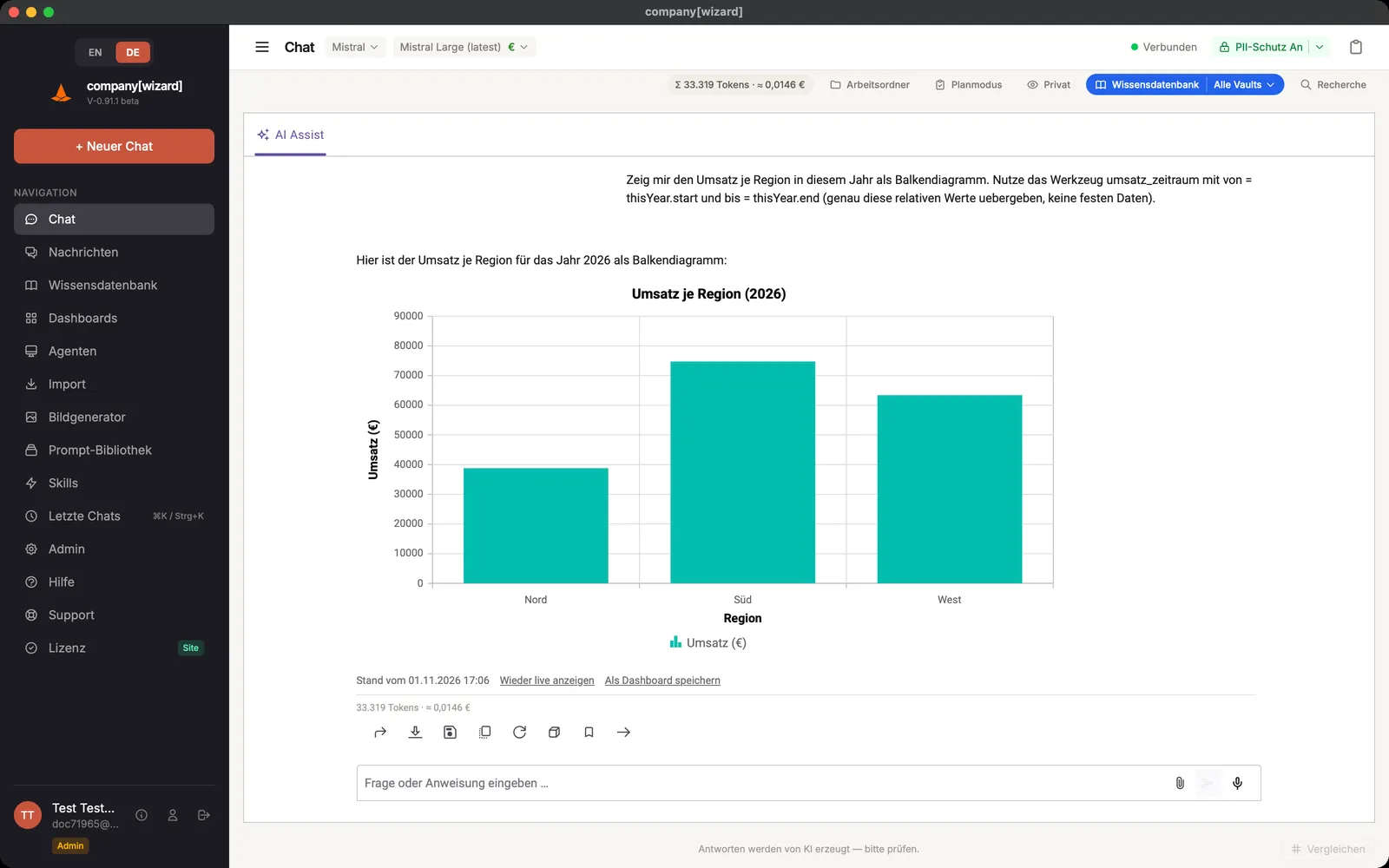
The same evaluation after “Keep this snapshot”: “Snapshot from …” and “Show live again”.
The button only appears below your own chat answers, and only if at least one part of the view delivers data.
Important: Kept values are shown without checking permissions again. If your administrators block the tool later, you still see the kept snapshot in your chat.
Where the data is stored
Section titled “Where the data is stored”For every query of an evaluation, CompanyWizard stores a reference together with the chat: which tool, with which parameter values (for example a customer name or a period). Keeping a snapshot adds the results themselves, i.e. columns and rows with real values.
- Web: references and kept results are stored in the database on your organization’s CompanyWizard server. The query results of the first 10 minutes are held by the server in memory only.
- Desktop: everything is stored in the local database on your computer.
In both cases, references and kept values are deleted with the chat, and also when your user account is deleted. Only keep what you really need as a snapshot; a live evaluation does not store results permanently.
Values from the model’s answer
Section titled “Values from the model’s answer”If a view says “Contains values from the model’s answer, not from the database.”, the AI wrote at least one number or table row into the view itself — for example from the knowledge base, an attachment, the web search, or because no suitable SQL tool was available. These values are only as good as the source the AI took them from, and they never update. Check them before you rely on them.
Inputs and clicking into a chart
Section titled “Inputs and clicking into a chart”- Inputs (desktop): Some evaluations have an input field or a slider, for example for “the top 10”. When you change the value, the view recalculates after a short pause — without asking the AI. An invalid value leads to the message “Calculation “…” not possible.”
- Clicking a chart point: With some charts, a click makes CompanyWizard write “Show me more details on …” into the chat’s input field. Nothing is sent until you send it yourself; you can change the text first.
Relative periods
Section titled “Relative periods”If you ask about “last quarter” or “this year”, the period stays relative in the evaluation. CompanyWizard recalculates it every time the view is displayed. If you open the chat in the next quarter, the live evaluation shows the then last quarter.
That is why the AI is instructed to write no fixed period such as “Q3 2026” into titles or text: it would be wrong the next time you open it. Where the period should be visible, CompanyWizard inserts it at display time. If the AI does not stick to this, the numbers still follow the relative period, but a year or quarter written into the text does not. If you want a fixed period, name it in the question (“revenue July to September 2026”) or keep the snapshot.
What “today” is depends on the clock of the computer running the query: in the web the CompanyWizard server, in the desktop app your computer.
Messages in the view
Section titled “Messages in the view”The English interface shows the messages below; the German interface shows their German counterparts.
When data is missing
Section titled “When data is missing”These messages appear in place of individual values. The rest of the view keeps showing data.
| Message | Meaning | What you can do |
|---|---|---|
| ”Loading data …” | The queries are running. | Wait a moment. |
| ”Data source not found.” | The stored reference to the query no longer exists. | Ask the question again. |
| ”Data is only visible to the creator of this evaluation.” | The evaluation is shown outside your own chat, for example shared or in the knowledge base (see below). | Open the evaluation in your own chat or ask the question there. |
| ”The query’s tool no longer exists.” | The SQL tool was deleted. | Ask your administrators or ask the question again. |
| ”The tool “…” is disabled.” | The tool or its data source is switched off or no longer released for the chat. | Ask your administrators. |
| ”No longer permitted to use the tool “…”.” | Your release for the tool was withdrawn. | Ask your administrators. |
| ”The license for the tool “…” is missing.” | The license does not (or no longer) include SQL tools. | Have the license checked, see License & edition model. |
| ”Query failed: …” | The database reported an error, for example a timeout. The text after it names the reason. | Try again; if the error persists, ask your administrators. |
| ”Data could not be loaded.” | The data could not be reached, in the web for example because the connection to the server was interrupted. | Try again. |
| ”Calculation “…” not possible.” | A calculation step of the view does not fit the data, or an input is invalid. | Correct the input value or ask the question again. |
| ”Column “…” not found.” | The query does not (or no longer) return this column, for example after a change to the tool. | Ask the question again. |
| ”Column “…” is not numeric.” | A calculation was supposed to use a column that contains no numbers. | Ask the question again. |
Try again only appears with “Query failed” and “Data could not be loaded.”, and only for live evaluations. The button runs the queries once more without asking the AI.
When the view cannot be built
Section titled “When the view cannot be built”If CompanyWizard cannot display the view itself, the chat shows its source text instead, with “View could not be rendered: … Showing the source instead.” above it. In place of the dots is one of these reasons:
| Reason | Meaning |
|---|---|
| ”The view is too large at … characters.” | The view exceeds the allowed size. |
| ”Component “…” is not available here.” | The building block does not exist here, for example a desktop block in the web. |
| ”“…” must bind its data through a path.” | A building block contains its data directly instead of through a query. |
| ”At most 8 data series (…).” | A chart has too many data series. |
| ”Map “…” is not available.” | This map does not exist. |
| ”No valid A2UI JSON in line ….” | The description of the view is faulty. |
| ”The view is incomplete or not built correctly.” | Parts of the view are missing or do not fit together. |
| ”Data can only be set as a whole, not at “…”.” | The view sets data in a way that is not allowed. |
| ”Inputs only write to a plain name such as “/n”, not to “…”.” | An input is wired incorrectly. |
In all of these cases it helps to ask the AI for a new, simpler view, for example “as a plain table, please” or, in the web, “only with a column chart and a table”.
Other notes
Section titled “Other notes”- “Result truncated – not all rows included.” — A query found more rows than the tool may return (your administrators set the limit in the tool, at most 1000). Sums and averages then only cover the rows returned. Narrow down the question, for example to a shorter period.
- “Chart has no usable data.” — The query returned no rows that can be displayed.
- “Field “…” is missing from the data (available: …).” — The chart expects a column the data does not have; the available columns follow.
- “No data to show.” — The query was empty.
- “Not found on the map: …” (desktop) — These regions could not be matched on the map.
- “The view could not be displayed.” — A building block failed while being displayed. Ask the AI for a different presentation.
Shared answers and knowledge base
Section titled “Shared answers and knowledge base”Outside your own chat, CompanyWizard queries no data for an evaluation — not even kept snapshots. This applies to answers shared in team messaging, to answers from agents there, and to chat answers saved to the knowledge base. In place of the numbers it says “Data is only visible to the creator of this evaluation.”, even for you.
The text of the answer and values the AI wrote into the view itself, however, travel with it. Check before passing it on: if the answer, or a view marked “Contains values from the model’s answer …”, contains something confidential, the recipients see it too.
Save as dashboard
Section titled “Save as dashboard”An evaluation has Save as dashboard below it. This turns it into a tile on a dashboard that loads its data fresh every time it is opened and can be filtered. → Dashboards
See also
Section titled “See also”- Dashboards — collect evaluations permanently on one page
- Set up a SQL data source as a tool — where the numbers come from
- Visual answers: diagrams & charts — Mermaid diagrams and simple charts
- Web vs. desktop — what is available only in the desktop app
- License & edition model — which edition includes what