Monitoring & health checks
AdminMonitor the application’s state in web/server operation: via HTTP health endpoints, OpenTelemetry telemetry and the audit logs visible in the app.
Health endpoints (web/Docker)
Section titled “Health endpoints (web/Docker)”| Endpoint | Purpose | Content |
|---|---|---|
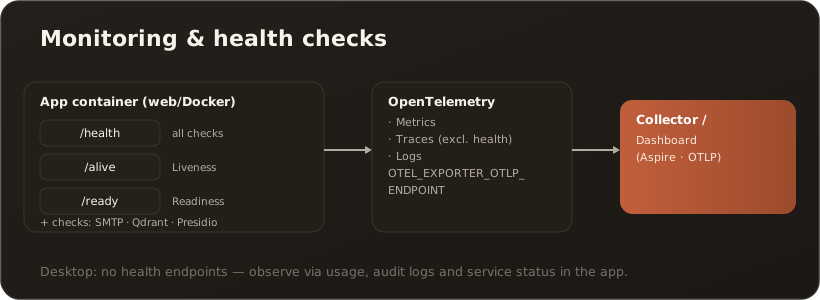
/health | Overall status | all checks must be green |
/alive | Liveness | only checks marked “live” (is the app responding?) |
/ready | Readiness | only checks marked “ready” (can traffic be accepted?) |
Registered in the ServiceDefaults (MapDefaultEndpoints). The Docker HEALTHCHECK probes /alive every 30 s (15 s start grace period). In Kubernetes, /alive works well as a liveness probe and /ready as a readiness probe.
Additional checks depending on configuration: SMTP (start probe), Qdrant, Presidio.
OpenTelemetry
Section titled “OpenTelemetry”Exports metrics (ASP.NET Core, HTTP client and runtime instrumentation), traces (requests/HTTP calls; health paths excluded) and logs. Export is active as soon as OTEL_EXPORTER_OTLP_ENDPOINT is set (OTLP, e.g. to a collector/the Aspire dashboard). A Sentry integration is optional (DSN-driven).
What admins see in the app
Section titled “What admins see in the app”- Usage – tokens/cost/requests/latency. → Usage statistics
- Audit logs – write operations on the knowledge base as well as PII audit. → Audit log (PII)
- Service status – SMTP/Qdrant/Presidio health in the System settings.
Desktop: no health endpoints; observe via the app tabs (Usage, Audit, Service status) and local logs.
Verification
Section titled “Verification”curl http://<host>:8080/alive→ HTTP 200;/ready→ 200 once dependencies are ready.- Telemetry appears in the collector/dashboard (when the OTLP endpoint is set).
Troubleshooting
Section titled “Troubleshooting”/readystays 503 – a “ready” check (e.g. database) is failing; check the logs.- No telemetry –
OTEL_EXPORTER_OTLP_ENDPOINTmissing/wrong or collector unreachable. - Presidio “unreachable” – PII pseudonymization degraded; see Set up Presidio.