Admin tab: Vault history (Logs)
AdminThe admin area Logs bundles three separate views: the PII Audit Logs (which personal data was detected), the vault history (what changed in terms of content) and the API Access Log (who technically accessed it). This article focuses on the vault history and how it differs from the access log. The PII Audit Logs are documented separately. → Admin tab: Audit log (PII)
What the vault history records
Section titled “What the vault history records”The vault history is a content-level change audit: it captures that and how the content of central (shared) vaults changed. Every content mutation to a central vault is recorded:
- Operations: create, update, delete, rename, move.
- Who: the acting user (or
Systemfor automatic operations such as import promotion). - When: the time of the change.
- Which operation and which path inside the vault was affected.
- Content hash (before/after): a checksum of the content before and after the change. If the hashes differ, the content counts as changed — a tamper-evident change record that does not store the content itself.
- Write path: the path the change came through (app/REST, MCP tool, or import).
The audit covers all write paths — including import promotion, which previously wrote into the vault without a record.
What is deliberately not recorded
Section titled “What is deliberately not recorded”- Personal vaults. Only central/shared vaults are audited; users’ personal vaults are excluded.
- No stored content. In this stage only the hash is kept, not the text itself.
- No diff and no rollback. Before/after comparison and restore are planned as a later stage and are not yet included here.
Vault history vs. API Access Log
Section titled “Vault history vs. API Access Log”Both views live in the Logs area but answer different questions:
| Vault history | API Access Log | |
|---|---|---|
| Asks | What changed in terms of content? | Who technically accessed it? |
| Focus | Content changes / governance | Technical accesses incl. denied attempts |
| Typical entries | Operation, path, content hash (before/after) | Method, path, status (incl. denial), duration, IP |
| Scope | Central vaults only, content mutations only | Accesses to knowledge endpoints and MCP write tools |
The API Access Log was originally called “Knowledge audit”, then “Access log”, and carries this name after the final UI restructuring. Its content and logic are unchanged; what is new is the clear separation of the views under Logs.
Linking via the request/correlation ID
Section titled “Linking via the request/correlation ID”For the same operation, both logs carry the same request/correlation ID. This lets you join a vault-history entry (“this path was changed”) with the corresponding access entry (“by this user via this endpoint, status OK”) — the content view and the technical view of the same request.
Where to find it & operation
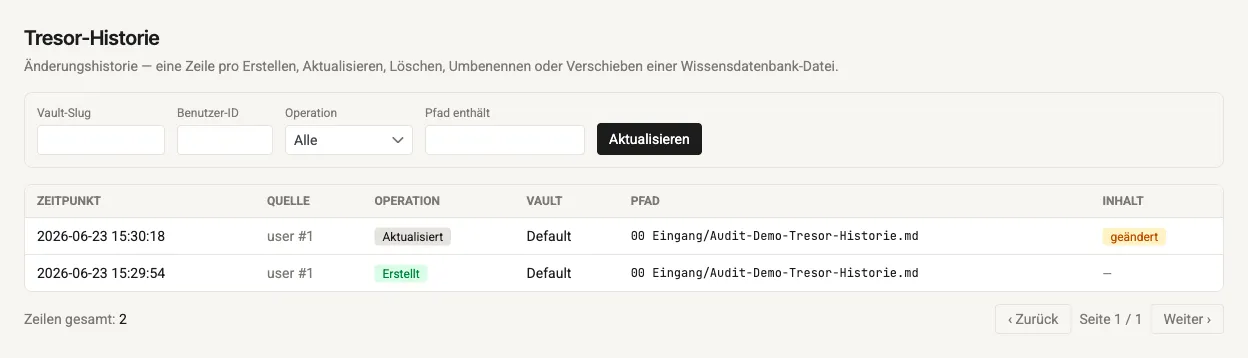
Section titled “Where to find it & operation”Admin area Logs → Vault history (for administrators only). The view is paginated and filterable.
- Columns: Timestamp, Source (acting user or
System), Operation, Vault, Path, Content (the “changed” indicator: hash before ≠ after). - Filters: Vault slug, User ID, Operation (Created, Updated, Deleted, Renamed, Moved) and “Path contains”.
Data-protection classification
Section titled “Data-protection classification”- Only central vaults are audited — never users’ personal vaults.
- Metadata and a content hash are recorded, not the content itself. The hash proves that a change occurred; it does not reconstruct the content.
- The audit is append-only and supports evidence and accountability obligations toward compliance and governance.