Backup & restore (desktop)
AdminDesktop only. This function does not exist in web/server operation – there you back up the database and volumes at the infrastructure level.
Back up the entire data set of a desktop installation into one encrypted, portable .zip file and restore it on the same or a different machine. A single passphrase protects both the payload data (AES-256-GCM) and the contained API keys, which are re-encrypted onto the target machine during restore.
Prerequisites
Section titled “Prerequisites”- Administrator role, desktop app open.
- A securely stored passphrase. ⚠️ If the passphrase is lost, the backup is irrecoverable – there is no backdoor.
- Enough storage space at the destination (external drive/cloud recommended).
Create a backup
Section titled “Create a backup”- Open Admin → Backup.
- Enter and confirm the passphrase (both fields must match).
- Choose folder – select the target folder via the native dialog.
- Click Create backup.
- On success the app shows the file path; the passphrase fields are cleared.
Restore
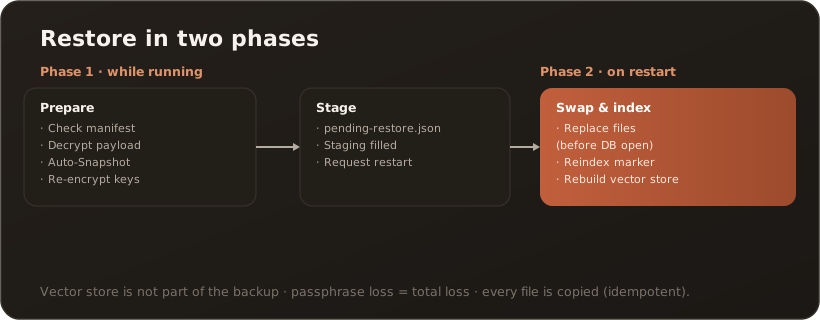
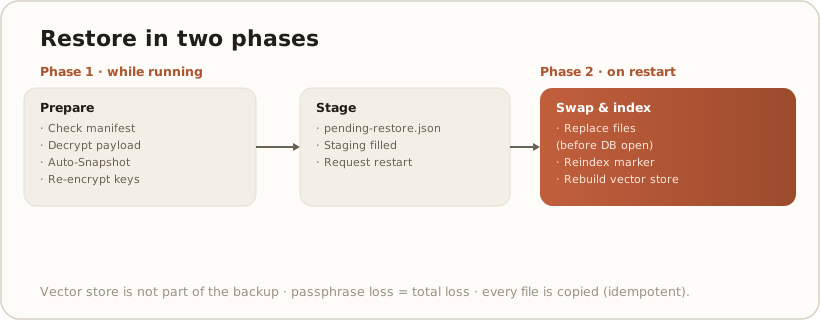
Section titled “Restore”Restoration happens on the next start (swap-on-next-start) so that no open database is overwritten.
- Open Admin → Backup.
- Choose the backup: Choose file (
.zip) or an auto-snapshot from the list. - Enter the backup’s passphrase.
- Click Restore (first confirmation step).
- Confirm – the restore is prepared (staging +
pending-restore.json); the app prompts for a restart. - Restart now – on startup the files are replaced before any database is opened; afterwards the vector store is rebuilt (it is deliberately not part of the backup).
Verification
Section titled “Verification”- After the restart: sign-in possible, knowledge base search returns hits (reindex complete).
- Model providers/MCP servers: API keys work (re-encrypted successfully).
Troubleshooting
Section titled “Troubleshooting”- “Schema blocked” during restore – the backup comes from a newer app version. Update the app first, then restore again.
- Wrong passphrase – decryption fails; no data is changed. Use the correct passphrase.
- Reindex appears to be missing – without Qdrant/sqlite-vec the app uses BM25 (no explicit reindex needed).
Limits
Section titled “Limits”- Passphrase loss = total loss of the backup.
messaging.dbis maintained viaEnsureCreated– when restoring across version boundaries, new columns are not added.- License status does not travel with it (machine-bound, located under
secure/).