License & edition model
AdminCompanyWizard is offered in three editions — Free, Pro and Site. The shared feature core is the same everywhere; the editions differ mainly in multi-user operation, team features and support. For model access there is the Managed AI add-on. evanto can also run a Site instance for you: Managed operation.
The three editions
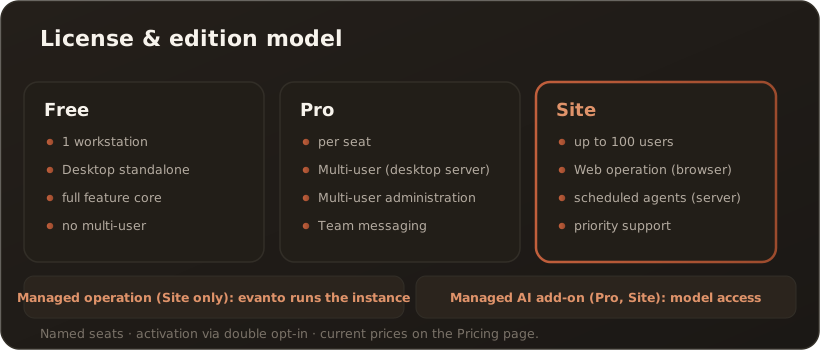
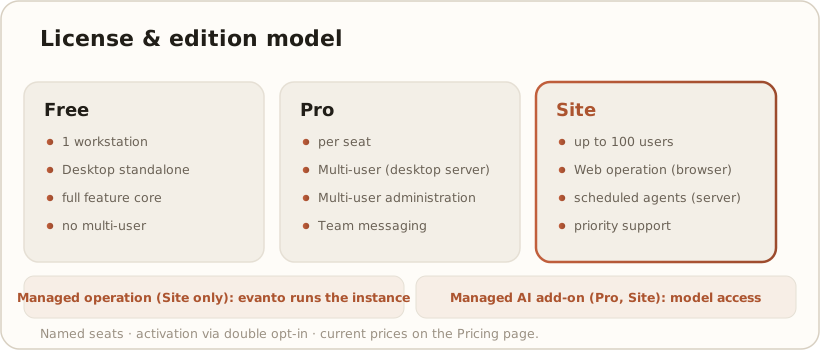
Section titled “The three editions”- Free (Solo) — free of charge, one workstation, standalone desktop operation. The full feature core; multi-user features are excluded. The customer brings the infrastructure (model, optionally Qdrant/Presidio) themselves (BYO).
- Pro — per booked seat; unlocks multi-user operation in desktop server mode (one desktop on the LAN serves additional seats). From Pro onwards you also get enterprise integrations & agent tools (LDAP/AD login, SharePoint/Confluence import, SQL, Git, calendar and contact tools — see the table). In desktop server mode, team messaging is available as well. Pro stays desktop-oriented.
- Site — per company, up to 100 users; everything in Pro. Site additionally unlocks the API/server mode — the web container (API + Blazor UI, self-hosted via Docker) with central user administration and multi-user web access, plus server-side continuously running, scheduled agents, plus prioritized support. How to run the web container: Run CompanyWizard Web with Docker Compose.
Seats & activation
Section titled “Seats & activation”- Named seats: billing is based on assigned/activated seats — an “active user” is an occupied seat. Seats can be assigned and released again; a seat can be reassigned to another person at most once per calendar month.
- Desktop server mode: every person who connects to the desktop server occupies a seat of the host’s license, the host admin included. Seats are counted per person, not per device. Connected clients take over the host’s license and need no activation of their own.
- Activation: passwordless in two steps (double opt-in). In the License area you see edition, status, occupied/maximum seats and device.
Managed operation (Site only)
Section titled “Managed operation (Site only)”Instead of running the Site instance yourself, you can have evanto run it, dedicated per customer in the R-KOM data center in Regensburg. This is an operating mode: you get the same Site instance, just without running servers and containers yourself. Managed operation is available only with the Site edition, in three tiers:
- S — operation of the instance, updates, availability monitoring; up to 25 seats and 5 GB vector data
- M — adds daily backups with 14 days retention and restore on request, incident handling on business days with a response target of 8 business hours; up to 50 seats and 20 GB vector data
- L — adds an availability target of 99.5 % as a monthly average (excluding announced maintenance windows; a target, not a warranty), a response target of 4 business hours and dedicated operation of Qdrant (vector database) and Presidio (PII detection); up to 100 seats and 50 GB vector data
For processing personal data a DPA then applies (GDPR & DPA). Managed operation includes no model access. → Multi-user in Managed operation
Managed AI add-on (Pro and Site)
Section titled “Managed AI add-on (Pro and Site)”With Managed AI, evanto provides access to the AI models — chat, embeddings, OCR and image generation, without a key of your own and billed against a fixed monthly budget. With Pro you book it per seat, with EU data residency or EU sovereign; with Site as a package. Managed AI does not depend on Managed operation and also works with an instance you run yourself. → Managed AI: what it covers
Desktop (Free/Pro) ↔ server/API (Site)
Section titled “Desktop (Free/Pro) ↔ server/API (Site)”The decisive difference is the operating model:
- Free and Pro are desktop-oriented. The application runs on the workstation; Pro extends this with the desktop server mode (one desktop on the LAN serves additional seats).
- Server-side operation as a web container is a Site feature. Only a Site license unlocks the API/server mode — the self-hosted Docker deployment of the API + Blazor web UI that users work with in the browser, with central user administration. Free and Pro cannot activate this mode. Team messaging does not depend on the web container: from Pro onwards it is also available in desktop server mode.
Getting it running: Run CompanyWizard Web with Docker Compose.
At a glance
Section titled “At a glance”| Feature | Free | Pro | Site |
|---|---|---|---|
| Workstations | 1 | per seat | up to 100 |
| Multi-seat in desktop server mode (LAN) | – | ✓ | ✓ |
| API/server mode (web container, self-hosted via Docker) | – | – | ✓ |
| Central user administration & multi-user web access | – | – | ✓ |
| LDAP/AD login (company login) | – | ✓ | ✓ |
| SharePoint/Confluence import | – | ✓ | ✓ |
| SQL data source (tool) | – | ✓ | ✓ |
| Git tools (workspace folders) | – | ✓ | ✓ |
| Calendar tools (MS365/CalDAV) | – | ✓ | ✓ |
| Contact tools (CardDAV) | – | ✓ | ✓ |
| Team messaging | – | ✓ | ✓ |
| Scheduled agents (server-side) | – | local | ✓ |