Keeping confidential data local
AllWhether private notes or confidential business data: CompanyWizard is built so that you decide where your data lives and whether anything leaves the machine. This article explains the model behind that. The concrete setup is described in How to keep confidential data fully local.
Three questions decide confidentiality
Section titled “Three questions decide confidentiality”- Where does the content live? In a local, private vault on your machine — or in a shared vault on a central instance?
- Where do the search vectors live? In the built-in sqlite-vec database locally — or in a Qdrant on the server?
- Which model answers the question? A local model on your machine — or a cloud model over the internet?
Only all three together determine the confidentiality level.
What always stays local
Section titled “What always stays local”- Private/local vaults (content and their search vectors) live on your machine and are never transferred to a central instance.
- The configuration sync between desktops (peer sync) transfers settings only (model providers, MCP servers, prompts, skill names, system settings) — no vault content, no knowledge documents, no vectors. → Connections / peer-server sync
- With a shared vault, the search runs live on the server; the desktop search fuses local and remote matches. Your private vaults stay in the local search throughout.
Important clarification: The vector backend is chosen globally per installation, not per vault. “sqlite-vec for private, Qdrant for shared” on the same desktop does not exist. The correct picture: local vaults are searched in the local backend (sqlite-vec or BM25), shared vaults on the server.
The model boundary (important!)
Section titled “The model boundary (important!)”The only point at which data can leave the machine is the call to the language model:
- With a cloud model, input PII is pseudonymized before sending (PII shield/Presidio). → The PII shield
- The knowledge context (RAG) from the vault is pseudonymized too — right after the search, before re-ranking and the prompt see it. What does go out in plaintext:
- the source reference of each hit (file path and section heading) — otherwise citations would be worthless;
- files the assistant reads via the workspace tools, including Git and Office files (desktop only) — deliberately exempt so code, paths and file names stay intact. → Tools: workspace & Git
- events from the calendar tools. → Tools: Calendar
- results of tools an admin has marked as a PII exemption. → Configurable tools
- everything, while “PII Shield Off” is selected in the chat (allowed by default; admins can lock the switch). → The PII shield
- Pseudonymized does not mean “not transmitted”: the content still goes to the provider, just with placeholders, and detection is pattern recognition — it can miss something and only works in a limited way while the detection service is disrupted. So “never leaves the machine” only holds with a local model.
- With a local model (e.g. Ollama/LM Studio) this step too stays on the machine — nothing goes out.
- And one more exit: every external tool the assistant calls (MCP server, configured tool) is an outbound path of its own. Its arguments are pseudonymized — unless an admin has marked that target as trusted, in which case it receives the original values. By default no target is trusted.
- And the embedding provider: when the knowledge base is indexed it receives document text in the original by default — no checkbox involved — until an admin enables scrub before embed. Search queries from the chat reach it pseudonymized unless it is marked as trusted. With a local embedding model both stay on the machine. → Trusted targets (PII egress)
Three confidentiality levels
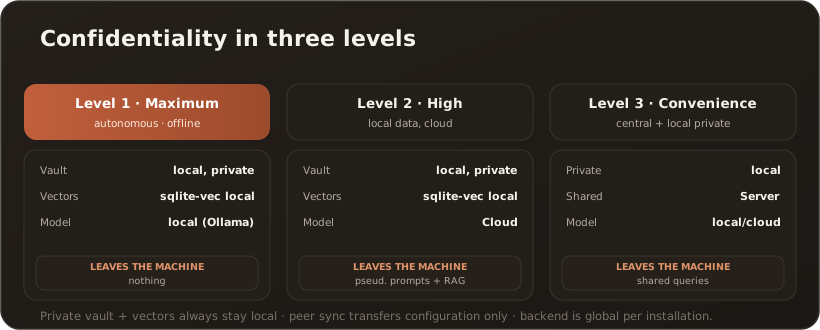
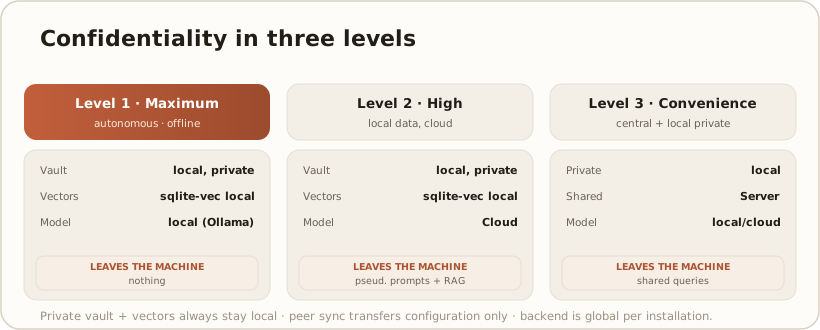
Section titled “Three confidentiality levels”Level 1 — Maximum (fully offline). Autonomous desktop without a central connection + local model + sqlite-vec. Content, vectors and model answers all stay on the machine. Nothing leaves the machine. Recommended for the highest confidentiality.
Level 2 — High (local data, cloud model). Autonomous or self-hosted operation + private local vault + cloud model. Content and vectors stay local; pseudonymized prompts go out together with pseudonymized RAG context — with the exceptions listed above (source references, workspace files, calendar, PII exemptions). Suitable when the best cloud model is needed and the vault content is accepted as company-controlled.
Level 3 — Convenience (centrally shared + locally private). The desktop pairs with a central instance for shared knowledge while also running private local vaults. Private stays local, shared lives on the server; the search fuses both. Best collaboration, with privacy cleanly separated.