Bring your own model — providers, keys, costs
AllCompanyWizard does not come with its own AI model that ties you down. Instead, you use your own provider and key — this keeps costs transparent, avoids vendor lock-in, and lets you pick the right model for each task.
The principle
Section titled “The principle”- Your key, your costs — usage runs through your contract with the AI provider. CompanyWizard charges no tokens; you see and control the costs directly with the provider.
- Your choice — multiple providers are possible; in the chat you choose the model per task (Switch the model per task).
- No lock-in — providers or models can be swapped without changing the application.
- One account, many tasks — one key per vendor is enough; whether it serves chat, embeddings, image generation or OCR is determined by the models your administration creates below it. With Managed AI you only need an account of your own for web search — for images it is still recommended. → Managed AI: what it covers
Supported providers
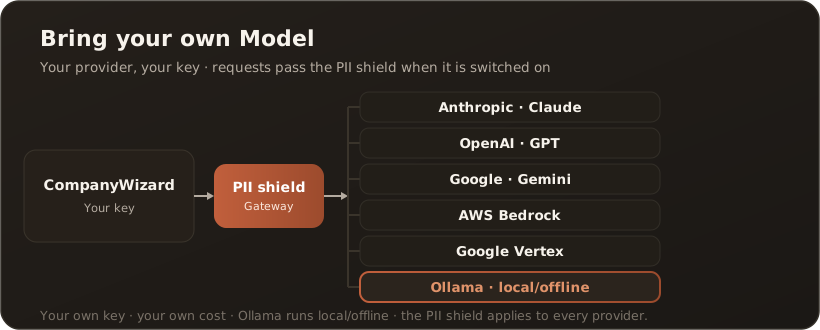
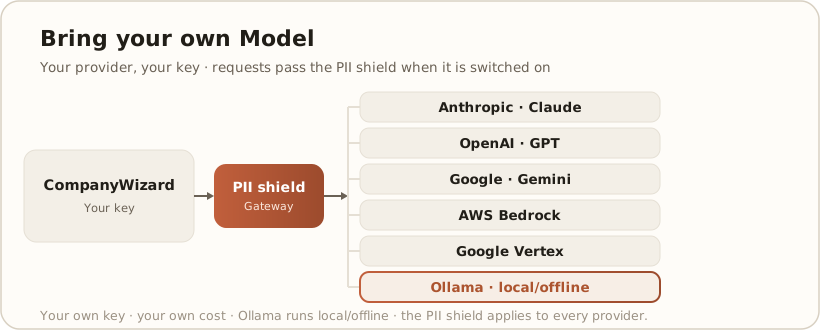
Section titled “Supported providers”CompanyWizard talks to Anthropic (Claude), OpenAI (GPT), Google (Gemini), AWS Bedrock, Google Vertex and Ollama, among others. Which of these are available is set up by your Administration (provider, key, default model).
Local models & offline
Section titled “Local models & offline”With Ollama you integrate local models that run on your own hardware. This makes AI usage possible without the cloud and without the internet — the highest level of data control, in keeping with the single-tenant idea of CompanyWizard.
Interplay with the PII shield
Section titled “Interplay with the PII shield”Regardless of the chosen provider, every request first passes through the PII shield, as long as it is switched on. Even with a cloud model, detected personal data only reaches it pseudonymized — with a few deliberate exceptions (such as workspace files). → Keeping confidential data local