Compare models in chat
UserModel comparison sends the same question to several AI models at once and lets you compare their answers under identical conditions. First you compare blind — without knowing which model wrote which answer — and vote for the best. Only then are the model names, tokens, runtime and cost revealed, together with an assessment by a judge model. That way you decide on quality, not on brand name.
Model comparison is a Pro/Site feature. → License & edition model
Start a comparison — two ways
Section titled “Start a comparison — two ways”Comparison has no menu entry of its own; you start it straight from the chat.
Way 1: From an existing answer
Section titled “Way 1: From an existing answer”Below every AI answer, the answer toolbar offers “Compare this question”. It carries that question into the start dialog — handy when you already got an answer and want to know how other models would have answered the same question.
Way 2: Via the Compare button in the prompt bar
Section titled “Way 2: Via the Compare button in the prompt bar”Type your question into the input as usual, but instead of sending it, click “Compare” below the input field. The button stays inactive while the field is empty. This compares a question across several models from the start, without first producing a normal answer.
The “Compare across models” start dialog
Section titled “The “Compare across models” start dialog”In the dialog you pick the models that should answer:
- Pick models (2–4): Tick at least two and at most as many models as your administrator allows (default 4, configurable up to 8). The hint “Pick 2–4 models.” shows the current upper bound.
- Your current chat model is already pre-selected — you only add at least one more. Further models may be pre-checked by your administrator.
- Live cost estimate: Each model row shows a rough cost estimate, with the “Estimated total” below. The sum updates on every tick and untick. It is a guide, not a binding price.
“Start comparison” launches the run and opens the results page.
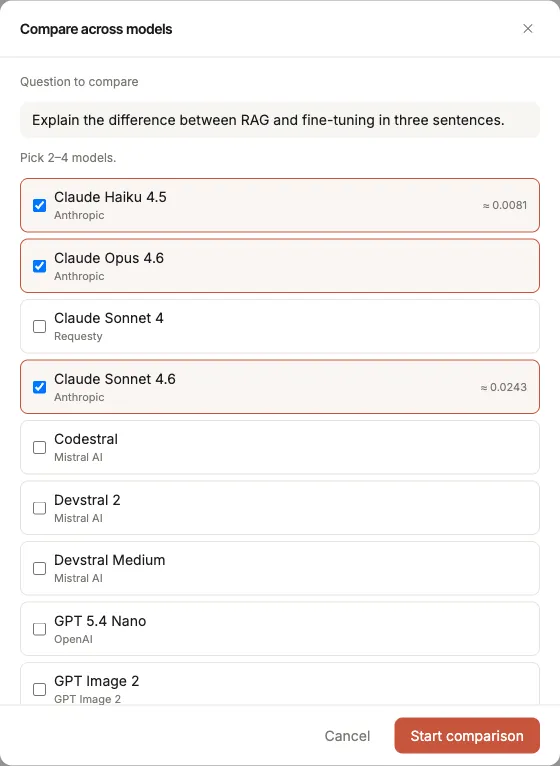
The start dialog: your active chat model is pre-selected; you add at least one more. Each row shows a cost estimate.
Why at least two models?
Section titled “Why at least two models?”A comparison needs two freshly run models. Even when you start the comparison from an existing answer, that answer is deliberately not reused — all selected models answer the question afresh so they respond under exactly the same conditions. That is the only way the comparison is fair.
Reading the results page
Section titled “Reading the results page”The results open on a page of their own (/compare/…). The flow has two phases: vote blind first, then reveal.
1. Vote blind
Section titled “1. Vote blind”At first you see the answers as anonymous cards with neutral labels — Answer A, Answer B, Answer C … Only the answer text is shown, no model name, no cost. The hint reads: “Pick the best answer. Model names and costs are revealed only after you vote.”
Read the answers at your leisure and click “This one is better” on the best.
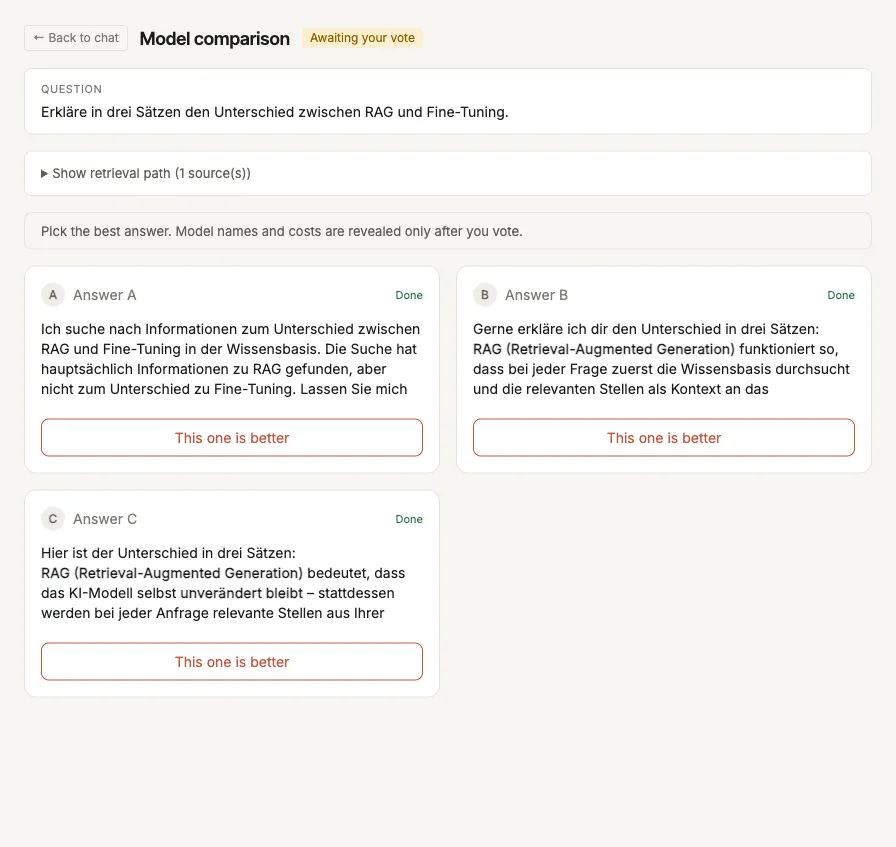
Blind comparison: only answer text, no model names or costs — you vote for the best.
2. Reveal — automatic after the vote
Section titled “2. Reveal — automatic after the vote”Your vote reveals the cards — there is no separate “reveal” step. As soon as you have voted, each card shows:
- Model name — which model wrote the answer;
- Tokens, Latency (runtime) and Cost of the model;
- the judge assessment — a judge model reviews the answers and marks each as suitable (✓) or with a caution (⚠) and gives a short recommendation.
If your choice differs from the judge’s assessment, a hint points this out and shows both — your choice stays visible, the judge assessment is added. If a compared model also acted as the judge, its self-assessment is flagged for transparency.
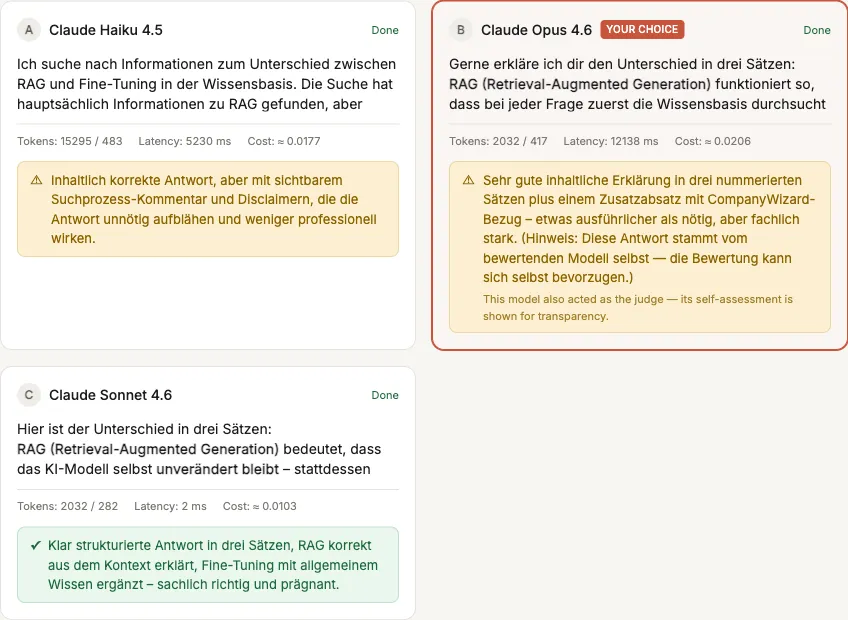
Revealed after the vote: model name, tokens/latency/cost and the judge assessment (✓ suitable, ⚠ with a caution) per card.
Good to know
Section titled “Good to know”- The page is reload-safe. Depending on the models, a comparison runs for several minutes. You can reload the page at any time or return later via the same address — the state (running / awaiting your vote / judging / completed) is reconstructed server-side from the run id.
- Mobile: The cards stack vertically; operation and flow are identical.
- Pro/Site licence required: Without an active Pro or Site licence, the start dialog shows an upgrade hint instead of an error (“Model comparison requires a Pro or Site licence.”). Your administrator enables the feature. → Configure model comparison