Administration (overview)
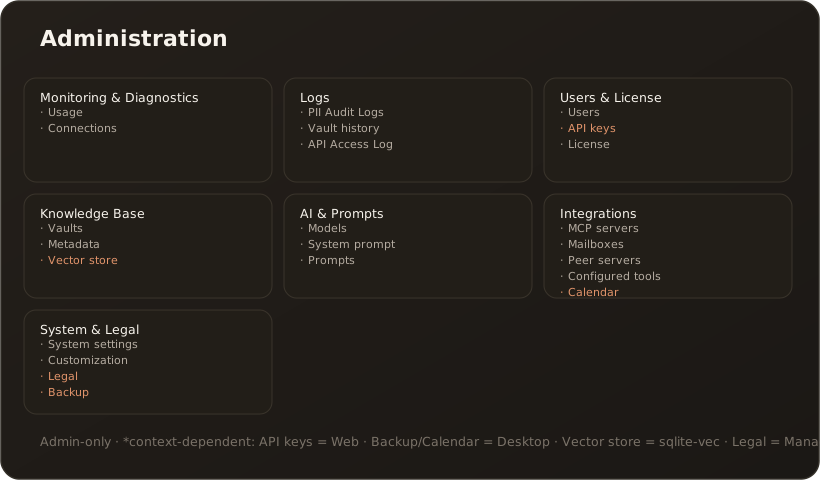
AdminAdministration (menu item Admin, route /admin) is the central management area of CompanyWizard and is accessible to administrators only. The start page shows an overview with tiles, grouped into seven areas. This reference gives the overview; the individual tabs are covered in depth in their own configuration articles.
Seven areas
Section titled “Seven areas”- Monitoring & Diagnostics — Usage, Connections
- Logs — PII Audit Logs, Vault history, API Access Log
- Users & License — Users, API keys, Limits, License
- Knowledge Base — Vaults, Metadata, Vector store
- AI & Prompts — Models, System prompt, Prompts, Workflows
- Integrations — MCP servers, Mailboxes, Peer servers, Configured tools, Calendar & contacts
- System & Legal — System settings, Customization, Legal, Backup
What Administration can do
Section titled “What Administration can do”- Manage users & roles (role/clearance assignment). → User management
- Define AI models & providers — vendor accounts (one key) with models per modality (chat, embedding, image, OCR). → AI models / providers
- Set cost limits & currency — monthly budgets per user and per model, billing currency, hard block before the model call. → Limits (cost budgets & currency)
- Create knowledge areas (vaults), control permissions and indexing. → Create a vault and grant permissions
- Connect external tools (MCP) and control access. → Connect an MCP server
- Define workflows — deterministic step pipelines with dry run, review steps and cron/webhook triggers. → Create and run workflows
- Connect calendars & contacts (CalDAV/CardDAV / Microsoft 365) — one DAV account provides both, desktop mode only. → Connect a calendar and contacts · Calendar tools · Contact tools
- Configure document export (Word template). → Store a Word template
- Review Logs — PII Audit Logs, Vault history and API Access Log. → Admin tab: Vault history (Logs)
- Maintain the metadata vocabularies — the pick lists for department, knowledge roles and more; ideally before the big import. → Admin tab: Metadata
- Maintain License/edition, company prompts, the system prompt, white-label and the system settings.
Context-dependent tabs
Section titled “Context-dependent tabs”Some tabs appear only under matching conditions:
- API keys — only in web/server mode.
- Backup — only in desktop mode (Backup & restore).
- Calendar & contacts — only in desktop mode (CalDAV/CardDAV / Microsoft 365; contacts via CardDAV only).
- Vector store — only when sqlite-vec is the active backend.
- Legal — only in Managed operation (DPA/GDPR).
Limits & notes
Section titled “Limits & notes”- The entire Administration requires the Administrator role.
- Sensitive values (e.g.
Encryption:ApiKeySecret) are set via environment/secrets, not entered in the UI in plain text. → Environment variables & appsettings