Document export
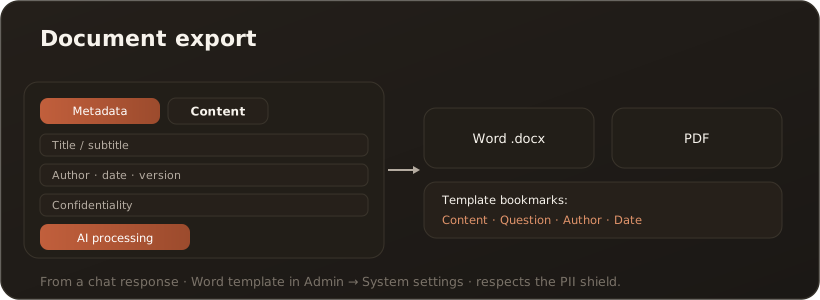
UserDocument export turns a chat response into a presentable Word, PDF, PowerPoint or Excel document. You open it via the “Export as Word” action on a response; a dialog guides you through metadata and content.
Interface
Section titled “Interface”The dialog has two tabs: Metadata (title, subtitle, author, date, version, confidentiality) and Content (Markdown editor with preview). An AI preparation generates a title/subtitle and cleans the text of filler phrasing; you can review and overwrite the result before exporting.
What the export can do
Section titled “What the export can do”- Formats — Word (
.docx), PDF, PowerPoint (.pptx) and Excel (.xlsx). - AI preparation — title suggestions and content cleaned of meta filler.
- AI slide outline (PowerPoint only) — on request the language model cuts the slides instead of the fixed rules; helpful for long answers without headings. → Export a response as PowerPoint
- Excel only with tables — the format
Excel (.xlsx)appears in the picker only when the response contains at least one table; without one the workbook would be empty. What lands in the workbook is exactly those tables, one sheet per table, with figures as real numbers. → Export a response as Excel - Metadata — flow into the document properties or into the template.
- Company template — Word works with named bookmarks (Content, Question, Author, Date), PowerPoint with placeholder types — two entirely different template models. Both are stored under Administration → System settings → Document export and filled in automatically on export. → Store a Word template · Store a PowerPoint template
Limits & notes
Section titled “Limits & notes”- The template is maintained by administrators; without a template a standard document is produced. There is no template for Excel — the workbook always comes out the same way.
- The Excel export carries over the tables only. Body text, lists and images stay out; if you need the whole document, use Word or PDF.
- The export respects the PII shield (cleanup before AI preparation). → The PII shield
- Available in web and desktop — the Excel export too, from the chat as well as from the knowledge base.