Analyse a file in chat (text/PDF)
UserYou can attach a file directly to a chat message — the AI reads its content and helps you summarize it, extract information, answer questions about it or review a text.
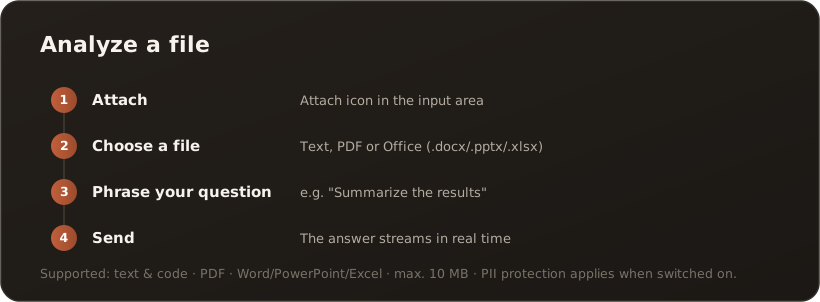
Step by step
Section titled “Step by step”- Attach — in the input area, click the attach icon (paperclip/upload). Alternatively: click into the input area and paste a file from the clipboard with Ctrl+V (Cmd+V on a Mac).
- Choose a file — select a file from your device. The filename appears in the input area.
- Phrase your question — write what the AI should do (for example, “Summarize the key findings” or “What measures does the document mention?”). Optional, but recommended.
- Send — with Enter or the send button. The answer is generated in real time.

Input area with an attached file and an example question — on the left the file chip, on the right the paperclip (attach) and send.
Supported file types
Section titled “Supported file types”- Text & code — including
.txt,.md,.csv,.json,.xml,.html,.css,.js,.ts,.cs,.py,.yaml/.yml,.sql,.log,.ini,.cfg,.toml. - PDF — standard PDF documents.
- Office documents — Word (
.docx), PowerPoint (.pptx) and Excel (.xlsx). They are automatically converted to text before the AI reads them.
The maximum size is 10 MB per attachment, and a message takes at most 10 attachments. If you pick more files, the ones that fit are attached; a notice above the input line names the files that were not attached. Images (.png, .jpg, .gif, .webp, .bmp) can be attached as well, but behave differently in several respects — they have their own page: Attach an image in chat.
Note: PDF and Office files are extracted to text form before analysis (server-side on the web, locally in the desktop app). A purely scanned PDF without a text layer contains no extractable text — use the Import page with OCR for that.
Your data stays protected
Section titled “Your data stays protected”Before the file content goes to the AI model, it passes through the same PII protection as every chat message: while protection is switched on, names, email addresses, phone numbers and other sensitive details are automatically detected and pseudonymized. This keeps detected personal data from reaching the AI provider in plain text — detection is pattern recognition, though, and can miss something. → The PII shield
- Ask specifically — a clear task leads to a better answer.
- Split large files — over 10 MB: extract the relevant sections or split the file.
- Multiple documents — a message takes no more than 10 files; for whole collections, going through the knowledge base is worthwhile rather than individual attachments.
What’s next
Section titled “What’s next”- Attach an image in chat
- Switch the model per task
- Save a chat answer to the knowledge base
- Go deeper: The PII shield (Concepts)