Multi-seat — desktop app in server mode
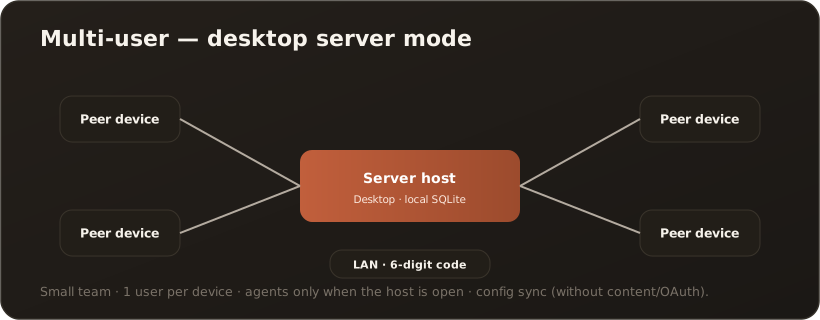
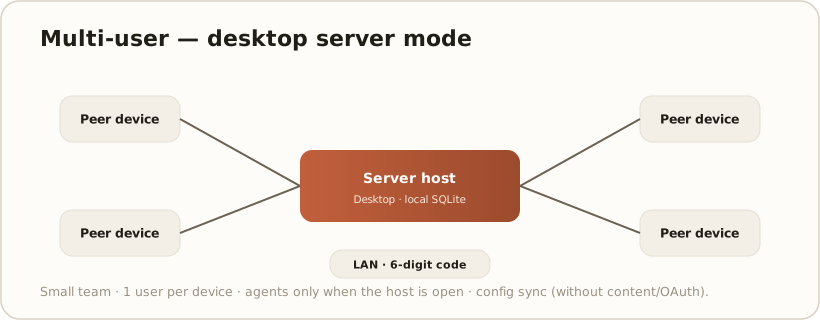
AllFor a small team without a dedicated server: one desktop instance takes on the server role, and additional devices pair with it over the local network. This way everyone shares the same configuration, without Docker or central infrastructure.
For whom
Section titled “For whom”Small teams (a handful of peers as a guideline) on the same network who want to work together quickly but do not want to run a server stack.
Components
Section titled “Components”- Server host: one desktop instance in server mode (embedded web host, local SQLite).
- Peers: additional desktop apps that sign in.
- Pairing: discovery on the network + TLS fingerprint confirmation + a 6-digit pairing code. Configuration such as providers, MCP, global prompts, System settings and Skill names is carried over — but not content (chats, knowledge documents, gallery) and not MCP OAuth tokens. → Peer sync / server mode
Steps (high level)
Section titled “Steps (high level)”- On the server host, enable server mode and generate a pairing code.
- On each peer, choose “join a server” in the first-launch wizard, confirm the host and enter the code.
- The configuration is carried over; API keys are re-encrypted locally.
Prerequisites & limits
Section titled “Prerequisites & limits”- All devices on the same network; Windows, macOS or Linux. Details: System requirements
- One user per device (by design); for larger teams use the API self-hosted or Managed operation variant.
- Scheduled agents only run while the server host is open — use the web stack for continuous operation. → Web vs. desktop
- Typically corresponds to Pro (per seat). → License & edition model