RAG & search: sqlite-vec vs. Qdrant vs. BM25
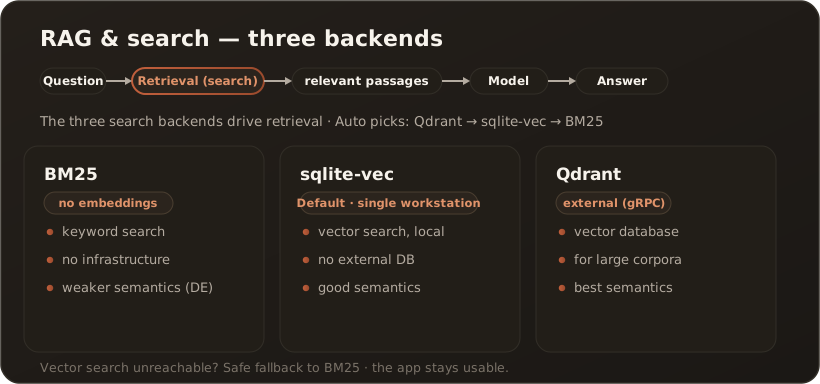
AllSo that the AI answers based on your documents, CompanyWizard searches the knowledge base and passes the matching passages to the model as context (RAG — Retrieval-Augmented Generation). There are three backends for search; which one applies depends on your configuration.
The three backends
Section titled “The three backends”- BM25 (keyword search) — a classic keyword search with no embeddings and no external database. Ready to use immediately, but purely literal: with synonyms and questions phrased by meaning (especially in German) the hit rate is noticeably lower.
- sqlite-vec (built-in vector search) — semantic search over a local file, without external infrastructure. The recommended choice for the single workstation: it understands meaning and there is nothing extra to run. Requires an embedding model.
- Qdrant (external vector database) — also semantic, but as a standalone service (gRPC). Worthwhile for large collections and in multi-user/web operation.
How the selection works (“Auto” mode)
Section titled “How the selection works (“Auto” mode)”By default CompanyWizard chooses automatically — in this order:
- Qdrant, if an endpoint is configured and reachable;
- otherwise sqlite-vec, if an embedding model is configured;
- otherwise BM25 as a fallback.
You can also fix a mode. Important: if a vector search is active but currently unreachable (e.g. Qdrant offline), the search safely falls back to BM25 at runtime — the app stays usable.
Hybrid search (BM25 + vector)
Section titled “Hybrid search (BM25 + vector)”When a vector backend is active, the BM25 keyword search is not merely a fallback: it runs in parallel and always as a second hit list, and the two result lists are then merged into one order (Reciprocal Rank Fusion). In short: both search paths always run; the results are merged. If the vector service goes down, keyword search carries alone.
This improves above all exact term matches that a purely semantic search occasionally misses: product names, error codes, abbreviations, and German compound words. Hybrid search applies wherever the knowledge base is searched — in chat (RAG), in the search_knowledge_base tool, and on the Knowledge page.
It is controlled by the admin toggle “Hybrid search (semantic + keyword)” in the system settings (default: on). The toggle takes effect immediately per search — no restart needed. Disable it to return to pure vector search.
Optional LLM re-ranking (Rerank)
Section titled “Optional LLM re-ranking (Rerank)”Regardless of the backend, an LLM re-ranking step can re-score and re-order the retrieved sections once more before the answer: the pre-search fetches more candidates, a cheap model sorts the most relevant to the top, and only the best make it into the context. This helps above all with weak recall (BM25 fallback, German synonym queries). The step is optional, needs a Pro/Site license, and does nothing without configuration (the normal RRF order applies then). → LLM re-ranking of chat knowledge hits
Which backend for what?
Section titled “Which backend for what?”- Single workstation, quick to get going: sqlite-vec (semantic) or, entirely without embeddings, BM25.
- Large knowledge collection / team / web: Qdrant.
- Just trying it out / no embedding key: BM25 is enough to start.
Note: When BM25 is active, the app shows a “Local index” notice. The hit quality is lower than with vector search — for productive knowledge work, sqlite-vec or Qdrant is worthwhile.
Related
Section titled “Related”- Configure the single workstation — search mode in the setup wizard
- Your first document in the knowledge base