Personal memory
AllPersonal Memory is a private, persistent context that the AI assistant carries across your sessions — for you alone. This way the AI does not have to learn recurring things (role, preferences, fixed facts) from scratch every time.
How something enters memory
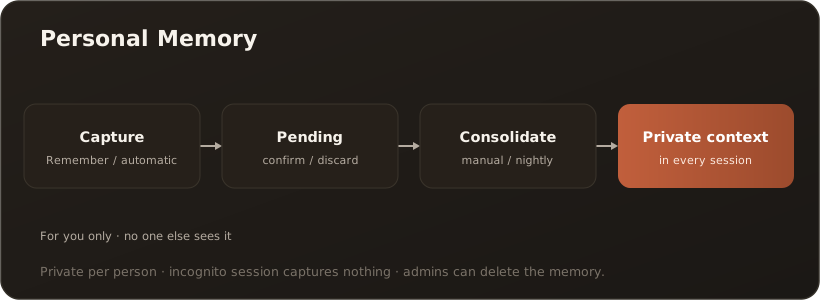
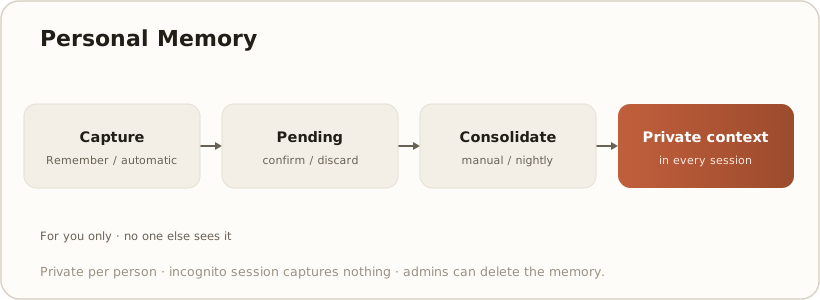
Section titled “How something enters memory”- Capture — you mark an AI answer with “Remember”, or the assistant remembers something itself (automatic capture). New entries first land as “Pending”.
- Confirm — in the Memory area of the sidebar you review pending entries and confirm or discard them. You stay in control.
- Consolidate — confirmed entries are merged into a tidy memory (manually or via a nightly run).
The consolidated memory then flows into every new session (as “Persona / About you / What I remember”).
Privacy — clearly governed
Section titled “Privacy — clearly governed”- Strictly per person: Personal Memory is tied to your user account; no one else sees it.
- Private mode: in a session marked as private/incognito, nothing is captured automatically.
- Administrable: administrators can completely delete a personal memory if needed (purge).
- Honestly: remembered text is stored as it was captured (no additional PII redaction within the memory itself). So only remember what you want to keep permanently.
Don’t confuse it
Section titled “Don’t confuse it”“Remember” (Personal Memory) is something different from saving an answer into the knowledge base: memory is your private AI context, the knowledge base is a shared document source. See Save a chat answer to the knowledge base.