Visual answers: diagrams & charts
AllIn chat the AI answers some questions not only with text but visually: it draws structure and processes as a diagram and quantitative data as an interactive chart. This happens on its own — you don’t have to request a format, a fitting question is enough (you can still trigger it deliberately, see Worked examples).
When a diagram, when a chart?
Section titled “When a diagram, when a chart?”- Structure & process → diagram (Mermaid). Processes, relationships, states, classes — anything connected that isn’t measured values.
- Quantitative data → chart. Numbers you compare or track over time.
The AI picks the right one itself, based on your question.
Diagrams (Mermaid)
Section titled “Diagrams (Mermaid)”The AI can render five diagram types:
- Flowchart — processes and branches, step by step.
- Sequence diagram — who communicates with whom, in what order.
- Class diagram — objects/entities with their fields and relationships.
- State diagram — the states of an object and the transitions between them.
- ER diagram — entities and their relationships (data model).
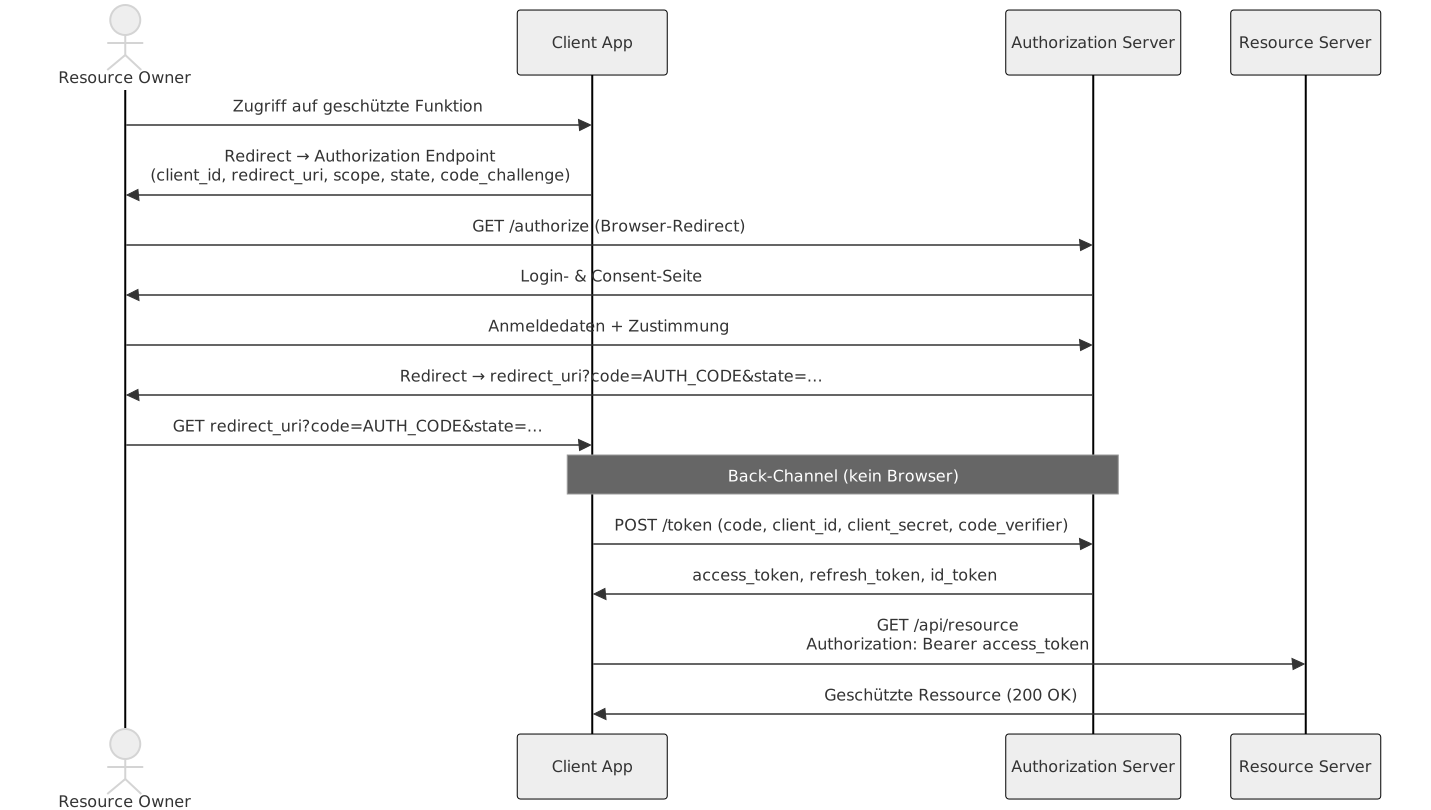
Example: asked to “show it as a sequence diagram”, the AI renders a diagram straight in the chat.
Charts (quantitative data)
Section titled “Charts (quantitative data)”Three chart types are available:
- Bar chart (
bar) — compare values across categories. - Line chart (
line) — show a trend over time. - Pie chart (
pie) — shares of a whole.
Charts are rendered as interactive diagrams, not a static image.
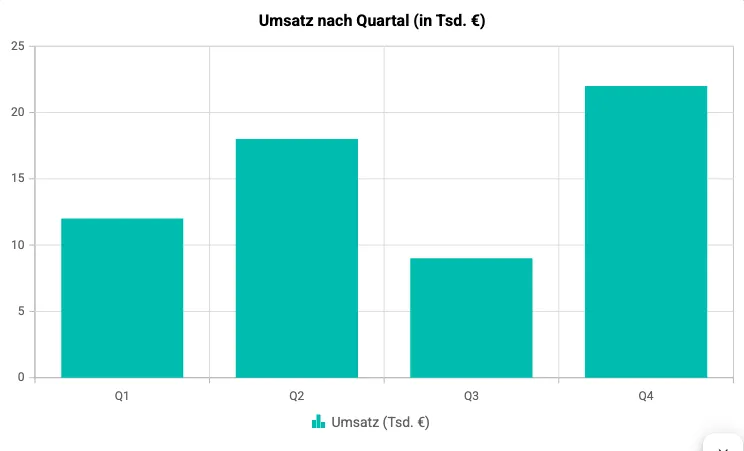
Example: “compare the revenue of quarters Q1–Q4 … as a bar chart” yields an interactive chart.
Safe degradation behavior
Section titled “Safe degradation behavior”Visual answers never fail hard:
- Invalid diagram/chart → the AI shows the underlying code block instead (with a subtle hint for charts). No crash, no empty answer.
- Word export → a chart is degraded to a readable code block in the document so the document stays complete.
Save to the knowledge base
Section titled “Save to the knowledge base”A visual answer can be taken straight into the knowledge base via the answer toolbar. → Save a chat answer to the knowledge base
- On opening, the knowledge-base viewer renders the diagram or chart identically to the chat.
- The answer’s source text is preserved and indexed by search (RAG) — the AI can find the content again later.
Limits & notes
Section titled “Limits & notes”- No free interactive HTML/JS content — deliberately limited to the diagram/chart types above (free artifacts are a later topic).
- Desktop: diagrams and charts render offline too.
- For safety, HTML coming from the AI or the knowledge base is sanitized before display.
Related
Section titled “Related”- Worked examples: visual answers — prompts to reproduce
- Chat · Knowledge base
- Save a chat answer to the knowledge base