Email mailboxes
AdminEmail mailboxes connect CompanyWizard with your company’s mail accounts. They are created under Administration → Mailboxes (administrators) and serve as an import source for the knowledge base as well as a data source for agents.
Interface
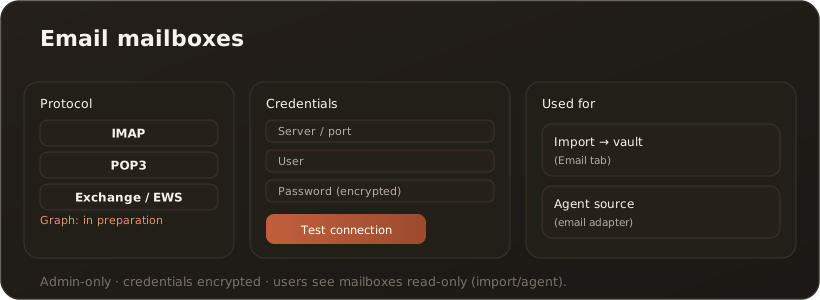
Section titled “Interface”In the mailbox management you set, per account, the protocol, server/port, credentials and (for Exchange) the server URL and version. A Microsoft 365 account only needs the mailbox address and is bound to your Microsoft sign-in with “Connect with Microsoft” — no password. Test connection checks the access and, on a failure, names the reason and the next step; passwords are stored encrypted.
Supported protocols
Section titled “Supported protocols”- IMAP — fully supported.
- POP3 — fully supported (no folder selection; duplicate detection via Message-Id).
- Exchange / EWS (on-premises) — Basic or NTLM authentication, EWS URL and Exchange version selectable.
- Microsoft 365 / Exchange Online (Microsoft Graph) — own or shared mailbox, signed in via Microsoft instead of a password; an administrator consents once for the whole organisation. → Set up Microsoft 365
What mailboxes are used for
Section titled “What mailboxes are used for”- Import — filter messages via the Import page (Email tab) by time range and sender and bring them into the knowledge base. → Import · Import from an email mailbox as a source
- Agent source — an agent with the email source adapter reads incoming messages as input. → Agents
Limits & notes
Section titled “Limits & notes”- Admin-only: creating, testing and managing the mailboxes.
- Credentials are stored encrypted; when editing, the password is retained if the field is left empty.
- Microsoft 365: for a shared mailbox the connected Microsoft account needs full access; newly granted access takes about 15 minutes to become effective. After an import or on another computer the account has to be connected once more.
- Users see mailboxes read-only (import selection or in the agent editor).