RBAC & confidentiality levels
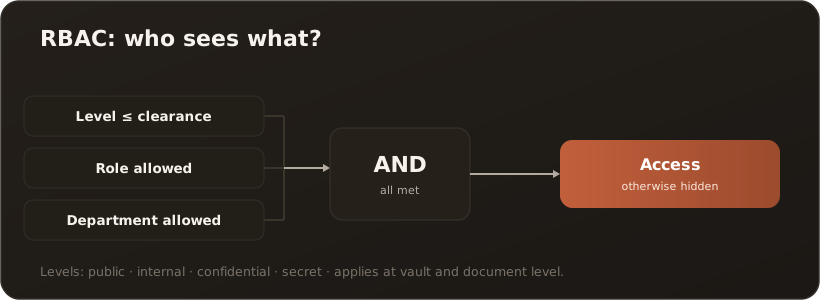
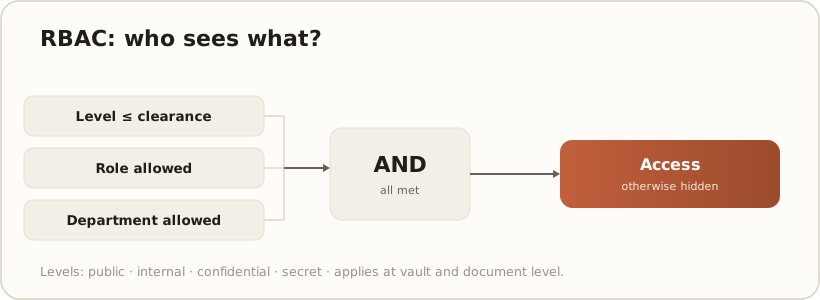
AdminOn every access — in the knowledge browser, in search and during RAG in the chat — CompanyWizard decides anew who may see what. The basis is a role-based model (RBAC) made of three ingredients: confidentiality level, roles/departments and clearance.
The four confidentiality levels
Section titled “The four confidentiality levels”Each document carries exactly one level — from open to strictly confidential:
- public — free across the company
- internal — internal standard
- confidential — confidential
- secret — strictly confidential
Roles, departments & clearance
Section titled “Roles, departments & clearance”- Roles & departments: the document and the vault name allowed roles and departments. Anyone who does not belong cannot see the content.
- Clearance: every user has a clearance level. It must reach or exceed the document’s confidentiality level.
How access comes about
Section titled “How access comes about”Content is visible only when all conditions are met:
Access = level ≤ clearance AND role allowed AND department allowed
The same check applies when the AI draws on sources during RAG: it never quotes anything that the person asking would not be allowed to see themselves.
The three enforcement levels
Section titled “The three enforcement levels”CompanyWizard applies this check in three tiers — from the knowledge area, through the individual document, into search:
1. Vault level
Section titled “1. Vault level”The vault decides first who sees it at all. These settings control that (in the Administration → Vaults tab, → Knowledge areas (vaults) & indexing):
- Allowed roles (
AllowedRoles) and allowed departments (AllowedDepartments) — only matching users see the vault. - Min. clearance level (
MinClearanceLevel) — the clearance the vault requires at minimum. - Personal (
IsPersonal) — belongs to exactly one person and is not shared. - Read-only (
IsReadOnly) — content is read-only. - Shareable (
IsShareable) — allows the vault to be shared beyond your own instance (see Shared vaults).
2. Document level
Section titled “2. Document level”Within a visible vault, each file carries its own fine-grained control in its frontmatter:
access-roles— allowed roles for this specific document.classification— the confidentiality level (public…secret).clearance-level— the required clearance level.
Newly created files are pre-filled with the vault defaults — DefaultAccessRoles, DefaultClassification and DefaultClearanceLevel — and can then be tightened or relaxed per document.
3. Search level
Section titled “3. Search level”Search filters too: hits a user may not see under the vault and document rules are hidden already in the vector store (Qdrant filtering) — they appear neither in the result list nor as a RAG source. → RAG & search
Shared vaults
Section titled “Shared vaults”A shareable vault (IsShareable) is the most delicate case, because content can leave your own instance. Here the rules apply especially strictly:
- Only released roles/departments see content — the vault level applies unchanged to shared content as well.
- Documents without frontmatter are treated restrictively: if
access-roles/classification/clearance-levelare missing, the file does not default to “open” but to the safe side (no implicit full access). - The server decides: with pairing or in server mode the access decision is made server-side — the requesting client receives only what the server-side RBAC releases.
For the step-by-step sharing flow see Create a vault and assign access rights.