Which services CompanyWizard contacts — backend connections
AllCompanyWizard is built for data sovereignty (Data sovereignty & dedicated instance). In the background it contacts only a small, clearly named set of services — and most of them are optional. This page lists exactly which connections exist, which are mandatory, which you can switch off, and what data travels each way.
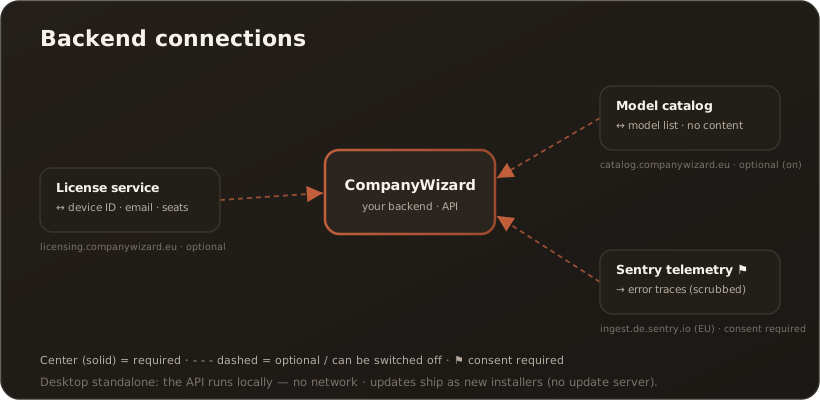
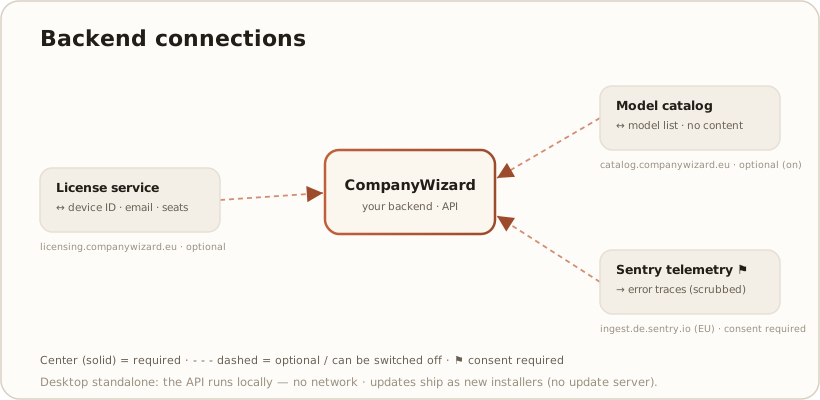
This article deliberately covers the platform/backend connections. The services you connect on purpose — your AI model provider, web search and mailboxes — are where your content actually leaves the system; they have their own pages and are summarised under Data you configure to leave.
Your own backend at the center
Section titled “Your own backend at the center”The CompanyWizard API is the product’s own backend — it is not a shared cloud. Where it runs is your choice (self-hosted or operated by evanto):
- Desktop, standalone — the API runs in-process inside the app. No network connection is needed at all.
- Desktop client / server, or hosted Web — the app talks to your API over HTTPS (
ApiBaseUrl), with JWT-secured requests.
All your content — prompts, documents, knowledge, auth — flows here. But this is your server, not a third party.
Required vs. optional — at a glance
Section titled “Required vs. optional — at a glance”| Service | Required? | Switch / default | Data (direction) | Your content? |
|---|---|---|---|---|
| CompanyWizard API (your backend) | Yes — except Desktop standalone (in-process, no network) | ApiBaseUrl; self-hosted or operated by evanto | Everything: prompts, documents, knowledge, auth (↔) | Yes — but your own server |
| License service | No | Only on activation + periodic check-in; otherwise no connection | Device-ID hash, email, company, version, seat roster ↔ license token | No content (email/seats only) |
| Model catalog | No | Admin toggle, default on; bundled snapshot fallback | Request only → model/MCP list (↔) | No |
| Sentry telemetry | No | Off until an admin consents (Admin → System settings) | Error traces, breadcrumbs, release tags — PII scrubbed (→ one-way) | No (scrubbed) |
The three platform services
Section titled “The three platform services”License service (licensing.companywizard.eu)
Section titled “License service (licensing.companywizard.eu)”Optional. An unlicensed install runs fully (the Free tier is a working, seat-capped tier) — nothing is contacted until you activate a license. After activation the app exchanges, during activation and a periodic check-in (heartbeat), a device-fingerprint hash, your email, company name, the version, and (for seat reporting) the roster of active users — and receives a license token and entitlements. No knowledge or document content is sent. Offline situations are handled gracefully. → Licensing & editions
Model catalog (catalog.companywizard.eu)
Section titled “Model catalog (catalog.companywizard.eu)”Optional, on by default. A daily refresh fetches the curated list of models and MCP servers (provider names, endpoints, version gates) — including model recommendations per modality (the basis of the provider quick-add) and embedding dimensions (autofill in the system settings). The request carries no user data (just a request ID); the response is the catalog JSON. You can switch the fetch off in Admin → System settings (model-catalog service on/off) — the app then runs from a bundled snapshot, so nothing breaks. → System settings
Sentry telemetry (ingest.de.sentry.io, EU)
Section titled “Sentry telemetry (ingest.de.sentry.io, EU)”Optional and silent by default. Even though a Sentry endpoint is built in, nothing is transmitted until an admin grants consent in Admin → System settings (telemetry). When enabled, the app sends error traces, breadcrumbs and performance traces tagged with the release and environment — one-way, never reading anything back. A PII scrubber removes API keys, e-mail addresses, IP addresses and connection strings before sending, and the endpoint is EU-hosted. → System settings
Data you configure to leave
Section titled “Data you configure to leave”The connections above are platform plumbing. The services where your content can actually leave the system are ones you set up — documented separately:
- Your AI model provider — prompts and retrieved document excerpts go to the provider and key you choose; with local models (Ollama) even inference stays in-house. → Bring your own model · Where do I get an LLM API key?
- Web search (optional, off by default) — search queries go to Brave or Serper. → Web search in chat
- Mailboxes (optional) — if you connect a mailbox, its content is read over your mail server.
All such keys are stored encrypted; see Environment variables & appsettings.
Desktop vs. Web — and updates
Section titled “Desktop vs. Web — and updates”- Desktop, standalone — no backend connection required; optional platform services (license, catalog, Sentry) only if you enable them.
- Desktop client / server & hosted Web — connections run over HTTPS through your API. → Web vs. Desktop
- Updates — the desktop app is updated via new installers (macOS
.pkg, Windows setup, Linux package); it does not contact an update server in the background.