Export an OKF bundle & keep the KB OKF-ready
AdminCompanyWizard can emit knowledge as an OKF bundle — a vendor-neutral, portable package of Markdown files. What OKF is and why is explained in the concept article Open Knowledge Format (OKF). This article shows what you do as an admin.
Export an OKF bundle
Section titled “Export an OKF bundle”Export is an admin action at folder or vault level:
- In the context menu of a folder or vault, choose “Export as OKF bundle”.
- In the dialog, check the scope hint (which area is exported) and decide whether to tick the checkbox “Include confidential/secret content” — it is off by default.
- Download the bundle as a
.zip.
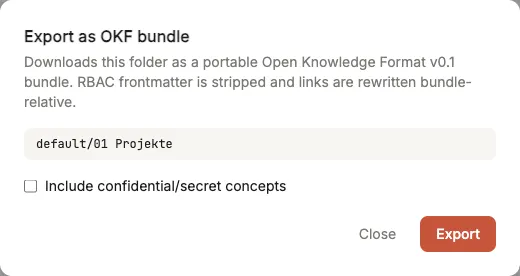
The export dialog at folder level — scope hint, the checkbox that is off by default, and the Export button.
Without an override, the default run exports only the public and internal levels. If the result fails OKF conformance (e.g. a missing index.md), that appears as a separate conformance notice (HTTP 422) — clearly distinct from “download failed”.
What the export does
Section titled “What the export does”The export projects rather than mutates — the live vault stays unchanged. On the way into the bundle:
- RBAC fields (
classification,access_roles) are stripped. - Links are rewritten to bundle-relative form.
- A frontmatter-less
index.mdis generated per folder.
A validator checks the projected output against the OKF conformance rules (§9); green means the bundle is OKF v0.1 conformant.
Keep the knowledge base OKF-ready
Section titled “Keep the knowledge base OKF-ready”Two idempotent admin maintenance actions keep the KB in shape (RBAC is preserved):
- Frontmatter normalisation — ensures a consistent
typefield and clean timestamps. descriptionbackfill — fills in missing descriptions from the first paragraph, otherwise via LLM.
Both feed directly into OKF (which benefits from consistent type/description) and, as a side effect, improve your own search snippets.
Import via cw-import
Section titled “Import via cw-import”The document import tool cw-import (PDF/DOCX/HTML/Confluence/SharePoint → KB Markdown) is the standard way to feed content into the knowledge base. It already produces OKF-ready frontmatter including description at import time (paragraph-first, LLM fallback) — so newly imported articles don’t land in the vault without a description. For the workflow see Import and release a document.
For MCP consumers
Section titled “For MCP consumers”Through the CompanyWizard MCP interface, the read projections okf_read and okf_tree deliver an OKF view of the vault — behind the RBAC gate, so filtered per caller and structurally leak-free. Context on the MCP connection: Connect an MCP server.
Outlook: OKF import
Section titled “Outlook: OKF import”The reverse direction — importing a foreign OKF bundle into the KB — is not yet available and planned as a follow-up feature. Until then, the standard import path is cw-import.