Admin tab: Model comparison
AdminModel comparison lets end users ask the same question across several models, vote blind for the best and receive a judge assessment. As an administrator you control the feature through a settings section of its own and through the licence tier. End-user operation is described separately. → Compare models in chat
Where to find it
Section titled “Where to find it”Administration → AI/Prompts area → “Model Comparison” section. The section configures the judge model, the default pre-selection and the per-run limit.
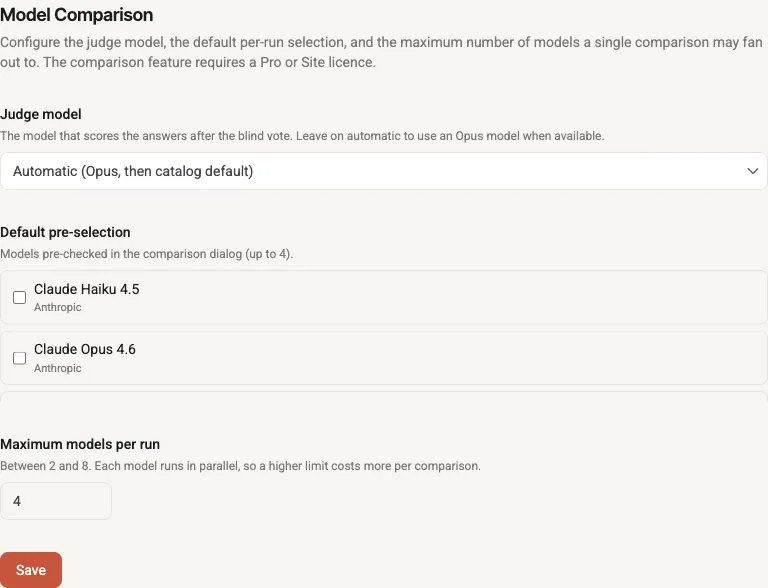
The admin section: judge model (Auto = Opus), default pre-selection and maximum models per run (2–8).
Judge model
Section titled “Judge model”The judge model is the model that scores the answers after the blind vote and gives a recommendation for each.
- Leave on “Automatic” (empty): the default. The run chooses on its own — “Automatic (Opus, then catalog default)”. Concretely: if an Opus model is enabled it is used as the judge; otherwise the catalog default chat model.
- Pick a fixed model: overrides the automatic choice with a specific enabled chat model.
Stale-judge warning
Section titled “Stale-judge warning”If the saved judge model is no longer an enabled chat model — e.g. because its provider was deleted or disabled — a warning appears: “The previously selected judge model is no longer available; comparisons fall back to the automatic Opus judge until you pick a new one.” Runtime falls back to Automatic automatically — comparisons keep working. Pick a new judge model when convenient, or set the value deliberately to “Automatic”.
Default pre-selection
Section titled “Default pre-selection”Sets which models are pre-checked in the end user’s start dialog (up to the configured upper bound). Independently of this, the user’s current chat model is always pre-selected anyway — the default pre-selection tops up the remaining slots. Saved models that can no longer be resolved are silently dropped on load.
Maximum models per run
Section titled “Maximum models per run”How many models a single comparison may fan out to in parallel. The value is clamped to 2–8 (default 4). Each additional model means one more parallel LLM run plus the judge assessment — so a higher limit costs more per comparison. If you lower the limit, an over-large default pre-selection is automatically trimmed to the new maximum.
Licence gate: Pro/Site
Section titled “Licence gate: Pro/Site”Model comparison is a Pro/Site feature and is enforced server-side — the settings here only configure it; the gate takes effect when a run starts.
- Free users see an upgrade hint in the start dialog instead of an error.
- Expired Pro blocks: a read-only-expired, revoked or downgraded licence status does not count as active — comparison is then locked.
Hot-reload — takes effect immediately
Section titled “Hot-reload — takes effect immediately”Changes to these settings take effect immediately, with no restart: the executor, the judge and the pre-selection re-read the values on every use. Saving is enough (“Settings saved.”).