LLM re-ranking of chat knowledge hits (Rerank, Pro)
AdminBefore answering, chat can optionally have an LLM re-score and re-order the hits from the knowledge base (re-ranking). The pre-search then deliberately fetches more candidates than usual, a configured model judges their relevance to the question in a single call, and only the best sections make it into the answer context. This improves answer quality above all where plain vector or keyword search falls short.
The feature is optional and requires a Pro/Site license. When it is not active, chat behaves exactly as before (RRF order, no extra LLM call). It works identically in web and desktop mode.
Requirements
Section titled “Requirements”The re-ranking step only runs when all three conditions come together:
- A default model of the “Rerank” category is set up (see below).
- The “LLM re-ranking of chat knowledge hits (Pro)” toggle is on (default: on).
- A Pro/Site license is active. On Free the step does not run.
If any of these is missing — or a runtime error occurs — chat falls back safely to the normal RRF order, with no extra call.
1. Create a rerank model
Section titled “1. Create a rerank model”Under Administration → Models, create or edit a model on a provider and set its modality to “Rerank (knowledge base)”; then mark it as the default. → AI models / providers
A rerank model runs over the normal chat client connection — so any chat-capable model can be used. A cheap, small model is the sensible choice: an inexpensive cloud model (e.g. Claude Haiku) or a local one via Ollama.
2. Toggle and limit
Section titled “2. Toggle and limit”Under Administration → System settings there are two settings:
- “LLM re-ranking of chat knowledge hits (Pro)” — on/off. Takes effect immediately, no restart. Default: on.
- “Rerank candidate limit” — how many candidates the pre-search hands over for scoring. Default 12, range 3–50. Higher values give the model more to choose from, but cost a little more time and tokens.
→ System settings / feature toggles
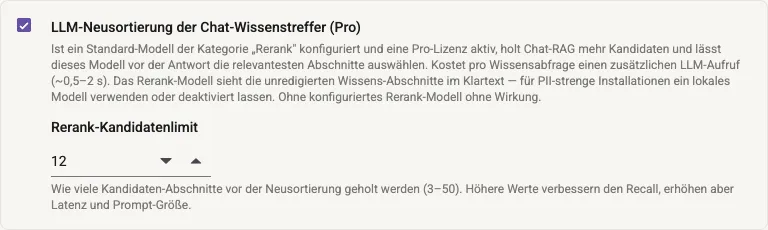
System settings → Chat knowledge search: the “LLM re-ranking … (Pro)” toggle and the candidate limit (default 12, range 3–50). The toggle takes effect immediately, no restart.
Effect — and when it pays off
Section titled “Effect — and when it pays off”The step costs one extra LLM call per knowledge query (~0.5–2 s of latency before the answer starts streaming — more, depending on the model and load). It pays off above all in a weak-recall situation:
- Desktop BM25 fallback without Qdrant — pure keyword search, no semantics. → RAG & search
- German synonym and semantic queries, where the pre-search returns many middling hits.
With already-good vector search over clean content the gain is smaller — there you can leave the toggle off and save the latency.
Traceability
Section titled “Traceability”Whether and how the re-ranking step ran is shown in the activity sidebar per chat message: a “Rerank” step with candidate and selection counts, the scores, and the duration. That makes it visible at a glance whether the step was active and which sections it lifted into the answer context.
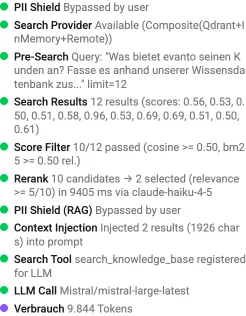
Activity sidebar: the “Rerank” step shows candidate count, selection, relevance threshold, duration, and the model used — here a rerank via claude-haiku as a small, cheap model.
Privacy note
Section titled “Privacy note”Important: the PII scan runs before re-ranking — over all candidates, right after the search. The rerank model therefore only sees the question and the knowledge sections pseudonymized, just like the answering model. It is still an additional recipient, though: the pseudonymized candidates go to one more model call, and in plaintext while the PII shield is switched off (“PII Shield Off”). → Keeping confidential data local
Recommendation for PII-strict installations: use a local model (e.g. Ollama) as the rerank model — or leave the feature switched off.
Limits & notes
Section titled “Limits & notes”- Admin-only. Only administration sets the model, toggle, and limit.
- Safe fallback: without a rerank model, without a Pro license, with the toggle off, or on any runtime error, it stays with the RRF order — no extra LLM call.
- Web = desktop: identical behavior in both modes.