Connect an MCP server (OAuth 2.0)
AdminVia MCP servers (Model Context Protocol) you extend the AI with external tools — such as database queries or API integrations. Admins manage the connection in the MCP servers area. The fastest way is the Quick add dialog: paste a URL, and CompanyWizard figures out the rest.
Path A: Quick add (recommended)
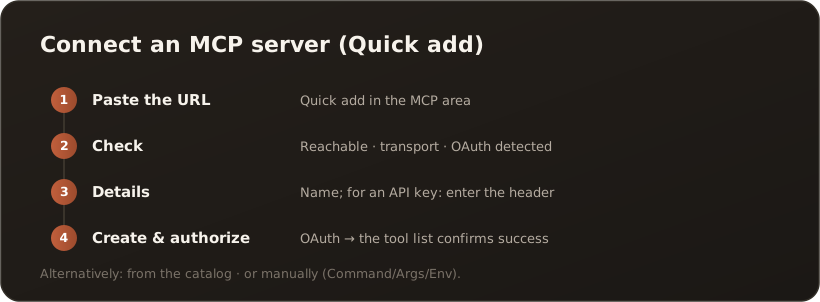
Section titled “Path A: Quick add (recommended)”- Paste the URL — in the MCP servers area, open the Quick add dialog and enter the server URL.
- Check — with Check, CompanyWizard tests the connection and shows Reachable, the transport and the detected authentication (badges).
- Confirm details — assign a name. If the server requires an API key in the header, enter it here; with OAuth, nothing further is needed.
- Create & authorize — the dialog creates the server, runs the authorization for OAuth and confirms success with the tool list. Auth-free servers show the tools directly.
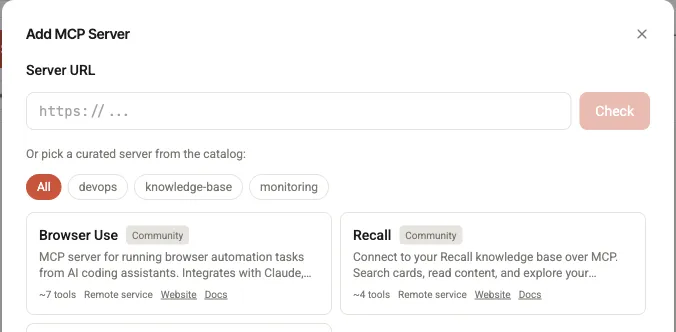
The Quick add dialog: at the top the URL field with Check (Path A), below it the catalog (Path B).
Path B: From the catalog
Section titled “Path B: From the catalog”In the same dialog you select a curated server from the catalog (with a trust badge); creation and authorization run as above.
Path C: Manual (Advanced)
Section titled “Path C: Manual (Advanced)”For local or special servers there is the advanced path with command, arguments and environment variables (stdio) — for example, npx or python with the necessary ENV keys.
Good to know
Section titled “Good to know”- View tools: Expand a server in the list to see its tools (name + description) — based on the description the AI decides when to use a tool.
- Invisible to users: In the chat the AI calls suitable tools automatically; users don’t have to configure anything.
- Import/export: MCP configurations can be exported and imported on other instances.
- Keep keys safe: API keys/credentials don’t leave the customer system.
What’s next
Section titled “What’s next”- Create an agent and test it in a dry run
- Go deeper: MCP in both directions (Concepts)