Connect a calendar and contacts (CalDAV/CardDAV and Microsoft 365)
AllThe assistant can read your calendar — through two providers behind a single, read-only abstraction: CalDAV (Nextcloud, Apple iCloud, German providers such as mailbox.org, Posteo, GMX, Web.de, self-hosted) and Microsoft 365 (via Microsoft Graph; Microsoft does not support CalDAV). Google is deliberately not included yet.
The same DAV account additionally provides your contacts (address books) via CardDAV — one sign-in, both services, no second account. If the server exposes address books, the assistant can read them too (Contact tools). Important: contacts are only available via CalDAV/CardDAV — Microsoft 365 provides no contacts.
The connection is per person: each signed-in person connects their own account. On Desktop (single workstation) that is the local user; on the Web each signed-in person connects their own account. This article covers the setup — connecting, testing, disconnecting. Using the calendar in chat is described in the tools catalog.
Where you connect
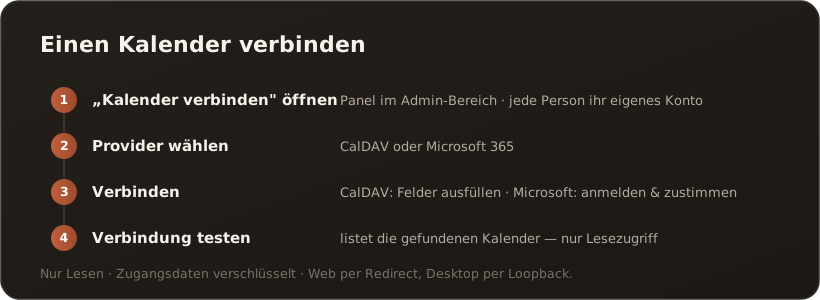
Section titled “Where you connect”In the “Connect calendars & contacts” panel (AdminCalendar). It lists the connected accounts with a display name, a type chip (Microsoft / CalDAV) and — for CalDAV — user · service URL. Each account offers the actions Test connection and Disconnect. After a successful connection the new row is briefly highlighted in green. Disconnect removes the account and therefore both services (calendars and contacts).
Connect CalDAV/CardDAV
Section titled “Connect CalDAV/CardDAV”Fill in the form: display name, service URL, user, app password. It is one DAV account — calendars (CalDAV) and address books (CardDAV) are read from it. Where possible use an app password, not your regular account password.
- iCloud: Create an app-specific password under your Apple ID. Enter
https://caldav.icloud.comas the service URL — the account-specific partition host (pXX-caldav.icloud.com,pXX-contacts.icloud.comfor contacts) is resolved automatically via discovery, so do not hardcode it. ⚠️ The app password is revoked when the Apple ID password is reset — recreate it and store it again afterwards. - Nextcloud: Create an app password / device password in the settings; the CalDAV URL is shown in your Nextcloud settings.
- mailbox.org / Posteo / GMX / Web.de: Enter the provider’s CalDAV URL and — where offered — use an app password.
Test connection probes both services read-only and reports the counters — e.g. “OK — 3 calendars · 2 address books.” A server with calendars but no address books is a neutral note, not an error.
Connect Microsoft 365
Section titled “Connect Microsoft 365”Click “Connect Microsoft account” — this starts a delegated OAuth sign-in (scopes Calendars.Read and offline_access).
- Web: the page moves over to the Microsoft sign-in and returns afterwards; the sign-in runs through the server. After you consent, the connected account appears in the list.
- Desktop: interactive sign-in via a local loopback (
http://localhost, MSAL.NET).
It is the CompanyWizard Entra app (multi-tenant). Admin prerequisite: some customer tenants require a tenant admin consent before individual users are allowed to consent. A tenant administrator grants the CompanyWizard app with the Calendars.Read scope for the organization; only then does the user sign-in succeed. Microsoft 365 provides calendars only — no contacts; those are available exclusively via CalDAV/CardDAV.
Security and privacy
Section titled “Security and privacy”- Read-only: the assistant cannot change calendars or contacts — no creating, editing or deleting, no invitations.
- CalDAV/CardDAV app passwords are stored encrypted (AES-256-GCM) — the same connection for calendars and contacts. On the desktop the Microsoft refresh token lives in the device’s credential store, not in the database; on the web the server keeps it — encrypted and separately per user. It is the same connection as for SharePoint: disconnecting removes both at once.
- PII for contacts: calendar reads run unmasked by design (first-party data). Contacts are third-party data and run through PII masking by default — see Contact tools for details.
- Secrets never leave the host and are never returned to the UI.
What’s next
Section titled “What’s next”- Calendar tools — using the calendar in chat
- Contact tools — using address books in chat
- Email mailboxes — the same pattern for connecting a mailbox
- Import an email mailbox as a source