Admin tab: knowledge areas (vaults) & indexing
AdminIn the Administration → Vaults tab you create knowledge areas (vaults), govern access and control the indexing that makes your content searchable for the AI. Working with the content itself is described in Knowledge base.
Creating a vault
Section titled “Creating a vault”A vault has a Name and a Slug (folder on disk). The step-by-step procedure is described in Create a vault and assign rights.
Controlling access
Section titled “Controlling access”| Field | Effect |
|---|---|
| Allowed roles | comma-separated knowledge roles that have access |
| Allowed departments | optional department filter |
| Min. clearance level | user needs at least this level |
| Default values | roles/confidentiality/clearance that new notes inherit |
| Visible / Read-only / System / Personal | behavior flags of the vault |
How these fields interact with user attributes: RBAC & confidentiality levels · User management.
Indexing
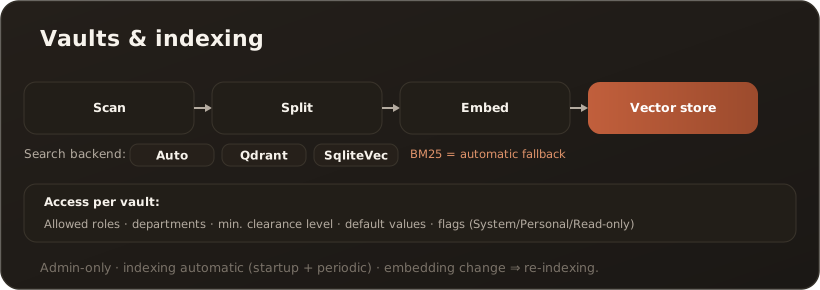
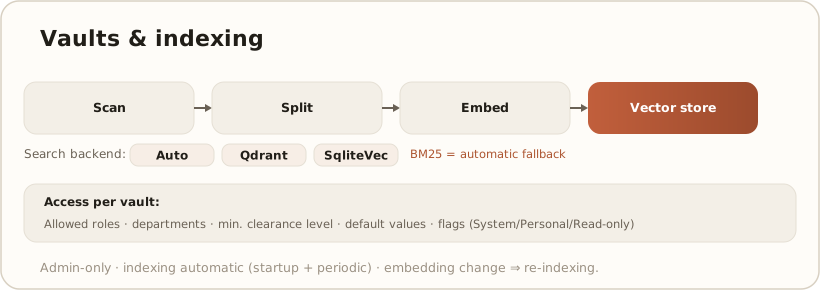
Section titled “Indexing”When Indexed is active, the vault runs through the pipeline scan → split into sections → embed → store in the vector store; orphaned entries are cleaned up. It runs automatically (at startup and periodically) and provides the basis for RAG in chat. → RAG & search
When exactly indexing happens — triggers per write path, startup behavior, cron, and Desktop-vs.-Web differences — is described in When content becomes searchable.
The search backend is chosen per installation (Auto, Qdrant or SqliteVec); if no vector service is reachable, CompanyWizard automatically falls back to the lean BM25 full-text search (lower result quality, especially with synonyms). Web typically uses Qdrant, the desktop uses sqlite-vec. → Set up Qdrant
Limits & notes
Section titled “Limits & notes”- Admin-only. Administration controls vaults and reindexing.
- Changing the embedding requires re-indexing the existing content. → AI models / providers
- Different embedding models across several workstations are safe — as long as no two models ever fill the same Qdrant collection. → Embedding models across workstations & vaults
- Content is Markdown; source formats are converted on import.