Knowledge base & vaults
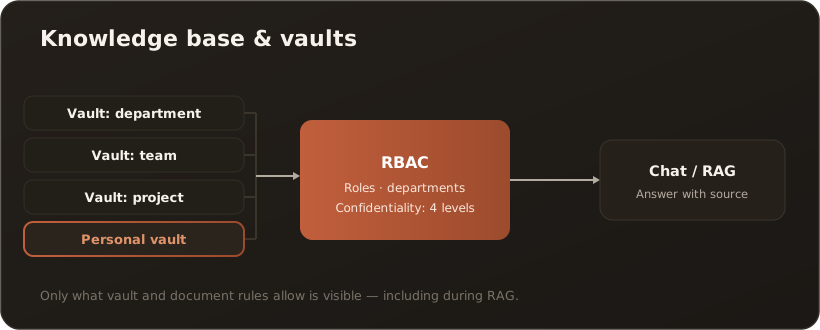
AllThe knowledge base is your company’s central document library. It is organized into vaults — bounded collections that serve the AI as a knowledge source (RAG) and control who sees what through roles and confidentiality.
Several vaults instead of one big pot
Section titled “Several vaults instead of one big pot”Instead of throwing everything into a single folder, vaults separate knowledge by department, team or project. Through the vault selection menu you switch between the areas you have access to. On top of that there is a personal vault — visible only to you, ideal for notes and drafts. On the desktop you can additionally create your own private vaults, which likewise only you can see — not even an administrator. → Create a private vault
Who sees what? (RBAC at two levels)
Section titled “Who sees what? (RBAC at two levels)”Access is governed at two levels:
- Vault level — each vault allows certain roles and departments. Anyone who doesn’t match doesn’t see the vault at all.
- Document level — each document carries a confidentiality level (
public·internal·confidential·secret) and its own role/department assignment.
Both levels work together: a document is only visible when both vault and document rules are met. The AI filters the same way during RAG — it only quotes what you would be allowed to see yourself. More on this: RBAC & confidentiality levels.
Links & structure
Section titled “Links & structure”Documents can be linked Obsidian-compatibly ([[wikilinks]] or kb: links); the references are resolved automatically. This creates a connected web of knowledge instead of isolated files.
Why good upkeep pays off
Section titled “Why good upkeep pays off”The more complete and better organized the knowledge base is, the more precisely the AI answers company-specific questions — always with a clickable source reference to the original document.